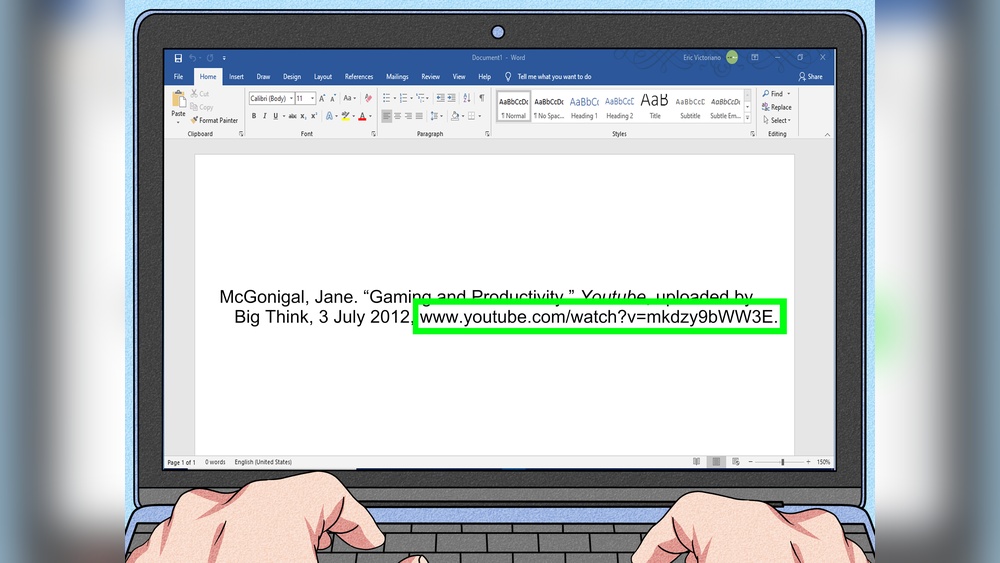
Are you struggling to figure out how to cite a YouTube video in MLA format? You’re not alone.
Getting your sources right can be tricky, especially with online videos. But don’t worry—this guide will make it simple. By the end, you’ll know exactly how to give credit where it’s due and avoid losing points on your assignments. Keep reading to master the easy steps that will boost your writing and impress your teachers.
Credit: www.youtube.com
Mla Citation Basics
MLA citation helps writers give credit to sources clearly and fairly. It follows a set format that keeps references consistent. This guide covers the basics of citing YouTube videos in MLA style. Understanding these basics is key to writing strong, credible papers.
Core Elements For Videos
Every MLA citation includes core elements in a specific order. For YouTube videos, start with the creator’s name. Next, add the title of the video in quotation marks. Then, include the website name, YouTube, in italics. Add the publisher, which is often the uploader. Finish with the upload date and the URL. These parts tell readers exactly where to find the video.
Formatting Rules
MLA citations use double spacing and a hanging indent. The first line aligns with the left margin. Each line after hangs about half an inch. Titles of videos go in quotation marks. Website names appear in italics. Dates follow the format day month year, like 15 Jan. 2020. URLs should be complete but without “http://” or “https://”. Keep punctuation and spacing exact for clarity.
Gathering Video Information
Gathering accurate video information is the first step in citing a YouTube video in MLA style. You need clear details to create a proper citation. This section breaks down the key elements to collect.
Author Or Creator
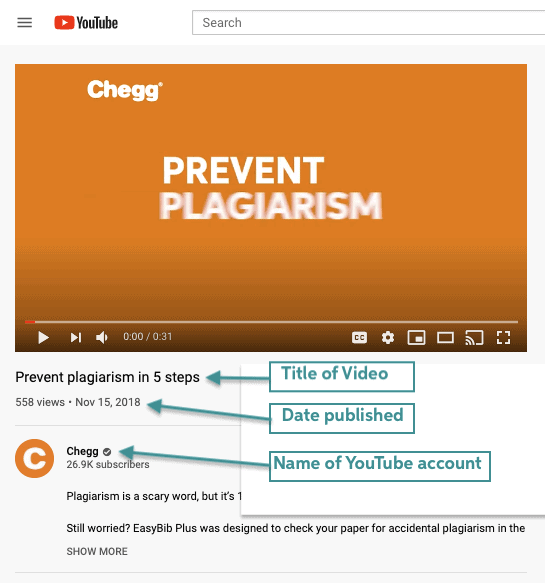
Identify who made the video. Look for the name of the person or group who uploaded it. This is usually shown below the video title. If the creator uses a username, use that as the author.
Title Of The Video
Copy the exact title of the video. Use quotation marks around the title in your citation. Make sure the title matches the video page exactly, including punctuation and capitalization.
Publisher And Upload Date
The publisher is often the same as the author or creator. Note the date the video was uploaded. This date is under the video player, near the view count. The upload date is important for MLA citations.
Url And Access Date
Copy the full URL of the video from the address bar. MLA requires the direct link to the video. Record the date you accessed the video. This shows when you viewed the content and is helpful if the video changes.
Step-by-step Citation Guide
Citing a YouTube video in MLA style can seem tricky. This step-by-step guide breaks it down clearly. Follow each step carefully to create a proper citation. This helps avoid plagiarism and gives credit to the creator.
Using the correct format makes your work look professional. It also helps readers find the original video quickly. Let’s start with how to create the citation itself.
Creating The Citation
Begin with the creator’s name or username. Use the real name if available. Put the name in the last name, first name format.
Next, add the video title in quotation marks. Use the exact title as shown on YouTube. Then, write YouTube in italics.
After that, include the uploader’s name, if different from the creator. Add the date the video was posted. Use the day, month, and year format.
Finish with the URL of the video. Do not include “https://” or “http://”. End the citation with a period.
In-text Citation Tips
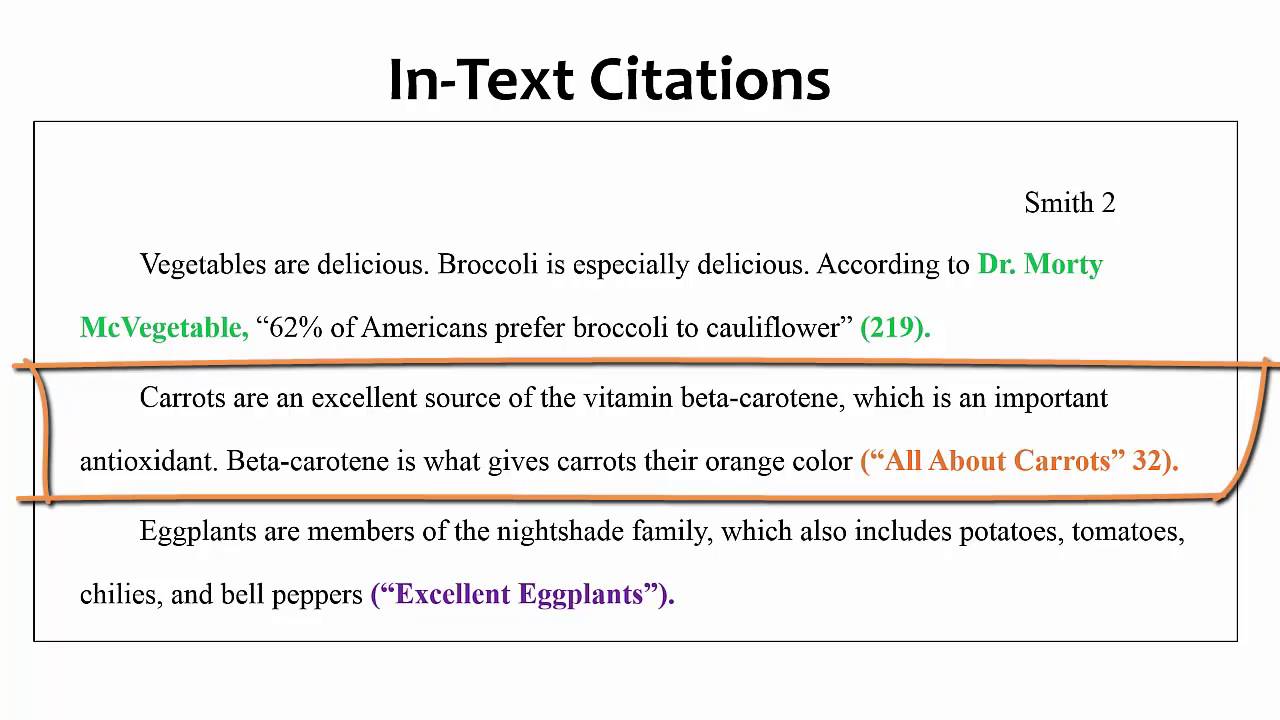
Use the creator’s last name in parentheses right after the reference. If the name is unknown, use a shortened video title.
Keep the in-text citation brief. It should match the first element of the Works Cited entry. Place it before the period at the end of the sentence.
This simple method keeps your writing clear. It also guides readers to the full citation easily.

Credit: studycrumb.com
Common Mistakes To Avoid
Citing a YouTube video in MLA style seems simple but often leads to errors. These mistakes can reduce your paper’s credibility. Avoiding them helps keep your citations clear and correct.
Common mistakes involve the author’s name, date, and URL format. Fixing these improves your citation quality and makes your work look professional.
Incorrect Author Attribution
Many writers confuse the video’s creator with the uploader. In MLA, use the real name of the person or group who made the content. If this is unknown, use the username. Do not list the uploader as the author unless they created the video.
Wrong Date Usage
Some cite the wrong date by using the access date or upload date incorrectly. MLA requires the date the video was posted online. Avoid listing when you watched the video unless your teacher asks for it.
Improper Url Formatting
URLs must be complete and direct to the video. Avoid shortened links or URLs with tracking codes. Use the full web address starting with “https://”. Do not include “http://” alone, as modern MLA prefers secure links.
Examples Of Mla Citations
Knowing how to cite a YouTube video in MLA style is important for your writing. This section gives clear examples to help you. These examples cover different cases. You will see how to handle videos with one author, many creators, or no author at all.
Single Author Video
For a video made by one creator, list the name first. Then add the video title in quotation marks. Write the website name in italics, followed by the upload date. End with the URL.
Example:
Smith, John. “How to Paint a Landscape.” YouTube, 5 Mar. 2021, www.youtube.com/watch?v=example123.
Multiple Creators
If the video has two or three creators, list all their names. Use commas between names and “and” before the last name. Then follow the same format as a single author video.
Example:
Brown, Lisa, and Mark Green. “Easy Yoga Exercises.” YouTube, 12 Jan. 2022, www.youtube.com/watch?v=example456.
No Author Available
When no author or creator is given, start with the video title. Put it in quotation marks. Then add the website name in italics, the upload date, and the URL.
Example:
“Top 10 Healthy Recipes.” YouTube, 20 Aug. 2020, www.youtube.com/watch?v=example789.
Tools To Simplify Citation
Citing a YouTube video in MLA format can be tricky. Tools exist to make this easier. They save time and reduce errors. These tools help create citations quickly. They also format citations correctly. This section covers two helpful tools.
Citation Generators
Citation generators create MLA citations automatically. Enter the video URL or details. The generator then produces a formatted citation. This saves manual work and ensures accuracy. Many citation generators are free and online. They support various source types, including YouTube videos. Using these tools reduces stress and speeds up writing.
Browser Extensions
Browser extensions help cite sources directly from the webpage. They detect the video and generate an MLA citation. You can copy the citation with one click. Extensions work within your browser for convenience. They update citations as you browse. This tool is great for quick referencing. It helps keep your workflow smooth and organized.
Credit: www.easybib.com
Frequently Asked Questions
How Do I Cite A Youtube Video In Mla Format?
To cite a YouTube video in MLA, include the creator’s name, video title in quotes, website name (YouTube), upload date, and URL. Format it as: Lastname, Firstname. “Video Title. ” YouTube, uploaded by Username, Day Month Year, URL.
What Details Are Needed For An Mla Youtube Citation?
You need the video’s creator, title, platform (YouTube), uploader’s name, upload date, and the video URL. This ensures your citation is complete and accurate according to MLA guidelines.
Can I Use A Username Instead Of The Creator’s Real Name?
Yes, if the real name is unavailable, use the uploader’s username in the author position. This keeps your citation clear and consistent with MLA rules.
How Do I Format The Video Title In Mla Citation?
The video title should be in quotation marks and in title case. This means capitalizing major words, following MLA formatting standards.
Conclusion
Citing a YouTube video in MLA is simple with these steps. Always include the creator’s name, video title, website, publisher, date, and URL. This keeps your work clear and credible. Proper citation shows respect for original content. It also helps your readers find the source easily.
Practice these rules, and citing videos will feel natural. Clear and correct citations make your writing stronger. Keep this guide handy for your next project.