Do you know who your YouTube subscribers really are? Understanding your audience is the key to growing your channel and creating content that truly connects.
Imagine having a clear picture of who supports you, what they like, and how to keep them coming back for more. You’ll discover simple steps to check who your subscribers are on YouTube. By the end, you’ll have powerful insights to boost your channel’s success.
Keep reading, because your next big breakthrough starts here.

Credit: www.tastyedits.com
Accessing Your Youtube Studio
Accessing your YouTube Studio is the first step to see who subscribes to your channel. This area lets you manage your videos and check your audience. The process is simple and fast. Follow the steps below to get started.
Logging Into Your Account
Open your web browser and go to youtube.com. Click the “Sign In” button at the top right corner. Enter your email and password linked to your YouTube channel. Press “Next” to log in. Make sure you use the correct account tied to your channel.
Navigating To Youtube Studio
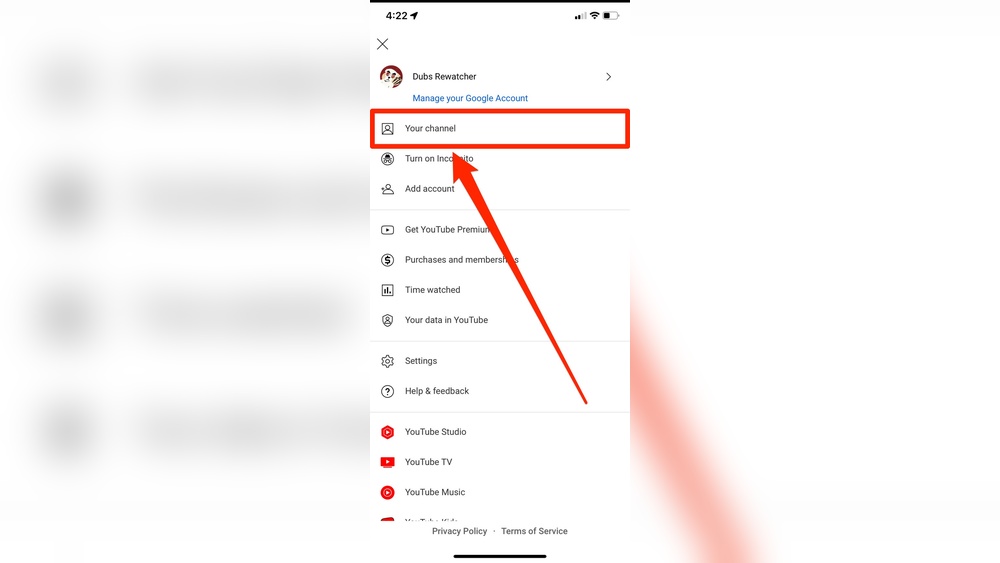
After logging in, find your profile picture at the top right. Click it to open a dropdown menu. Select “YouTube Studio” from the list. This action takes you to the dashboard where you control your channel. Here, you can check subscriber details and other analytics easily.

Credit: www.youtube.com
Finding Your Subscriber List
Finding your subscriber list on YouTube helps you know who supports your channel. It shows the people who like your videos and want to see more. This list can guide you to create better content for your audience. You can also thank your subscribers and build a stronger community.
Below are easy steps to find and understand your subscriber list on YouTube.
Locating The Subscribers Tab
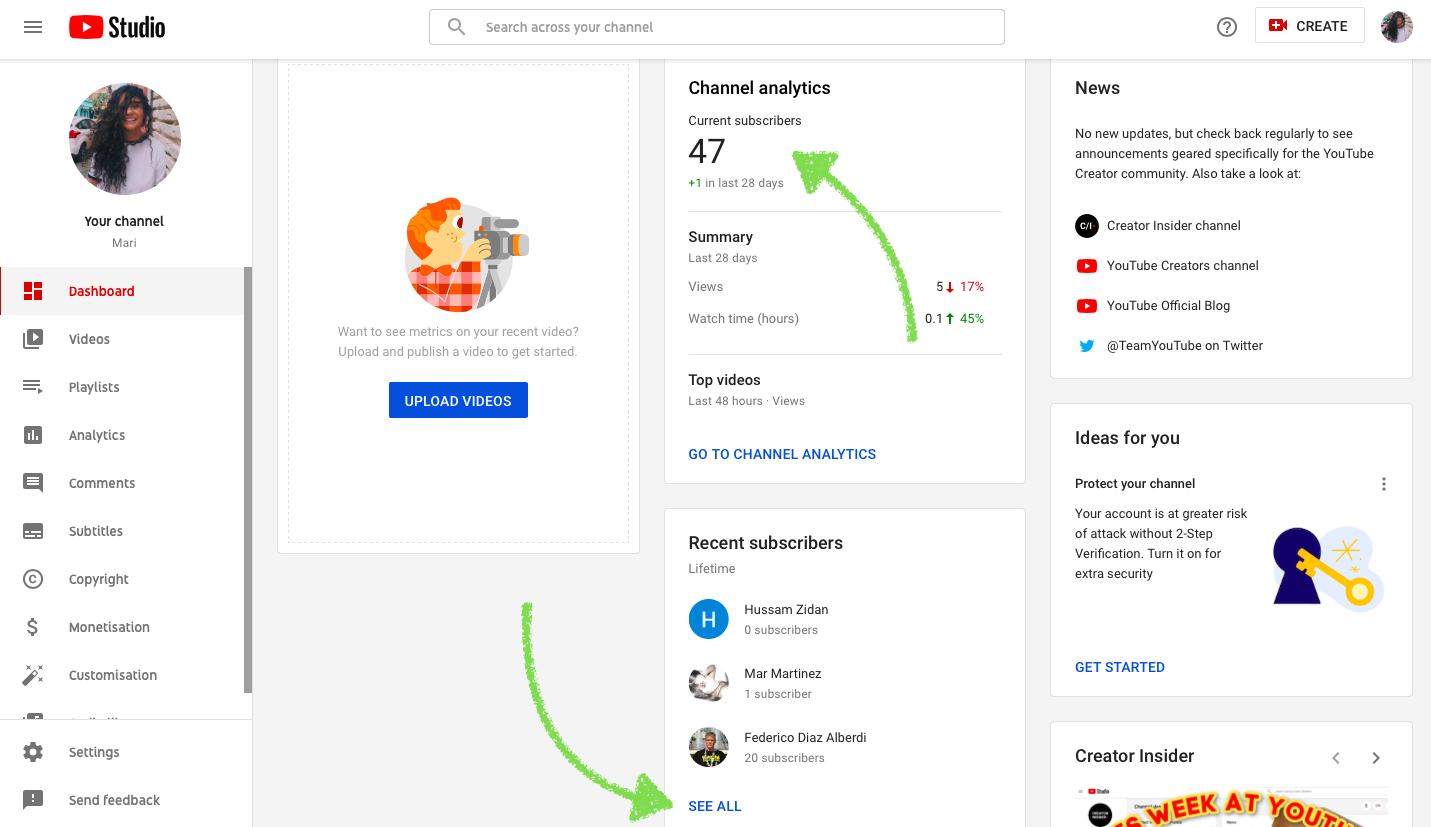
First, sign in to your YouTube account. Next, click on your profile picture at the top right corner. Select “YouTube Studio” from the dropdown menu. On the left menu, find and click “Audience.” Scroll down to find the “Recent subscribers” section. Click “See all” to view your full subscriber list.
This list shows your subscribers and when they joined. It helps you see who supports your channel lately.
Understanding Subscriber Visibility
Not all subscribers appear in your list. Some keep their subscriptions private. YouTube only shows subscribers who made their subscriptions public. This is to respect their privacy.
Subscribers who watch but hide their subscription will not be visible. You can still see the total number of subscribers on your channel homepage. The list shows only public subscribers.
Knowing this helps manage expectations about who you can see. Focus on engaging with those who follow you openly.
Interpreting Subscriber Information
Understanding your YouTube subscribers helps you connect better with your audience. The data YouTube provides shows who supports your channel and what interests them. This section explains how to read subscriber details and what limits exist in the data.
Details Available About Subscribers
YouTube shows basic info about your subscribers. You can see their channel names and profile pictures. The list often includes when they subscribed to your channel.
This helps you identify active followers. It shows which subscribers watch your content regularly. You can also find out their country if they share it publicly.
Knowing subscriber details guides your content choices. It helps you create videos that match your audience’s interests. This builds stronger connections and grows your channel.
Limitations On Subscriber Data
YouTube limits the information you can see. Not all subscribers appear in your list. Only those who allow their subscriptions to be public are visible.
Many subscribers keep their info private. This means you can’t see all your followers. Also, YouTube does not share personal details like email or age.
Data updates slowly. New subscribers might not show immediately. You should check regularly for the most current info.
Using Third-party Tools
Using third-party tools helps you learn more about your YouTube subscribers. These tools provide details YouTube may not show directly. You get insights on who watches your videos and how they engage. This information can guide your content and growth strategies.
Popular Tools For Subscriber Insights
Several tools offer detailed subscriber data. Social Blade shows channel growth and subscriber trends. Vidooly provides audience demographics and behavior. TubeBuddy helps track subscriber changes and engagement. These tools often have free and paid versions. They are easy to use and give clear reports.
Risks And Privacy Considerations
Using third-party tools means sharing some data. Always check if the tool respects your privacy. Avoid tools asking for unnecessary permissions. Some tools may misuse your channel data. Choose well-known and trusted services only. Protect your account by not sharing passwords or sensitive info.
Boosting Subscriber Engagement
Boosting subscriber engagement helps build a strong YouTube community. It keeps your audience interested and encourages them to watch more videos. Engaged subscribers are more likely to share your content and support your channel. Focus on clear communication and showing that you care about your viewers.
Responding To Subscriber Comments
Replying to comments shows you value your viewers’ thoughts. It creates a friendly space for conversations on your channel. Answer questions and thank viewers for their support. This makes subscribers feel noticed and appreciated. Active comment sections also attract new viewers to join the discussion.
Creating Content For Your Audience
Make videos that match your subscribers’ interests. Use YouTube analytics to learn what topics they like. Create content that solves their problems or entertains them. Keep your videos clear and easy to follow. Tailoring content to your audience keeps them coming back for more.
Credit: klintmarketing.com
Managing Subscriber Notifications
Managing subscriber notifications helps you stay connected with your YouTube audience. It lets you know who joins your channel and shows you their activity. You can control how and when you get alerts. This keeps your notifications useful and not overwhelming.
Customizing Alerts For New Subscribers
You can set alerts to notify you about new subscribers. Go to your YouTube Studio settings. Find the notifications section. Choose the type of alerts you want. For example, get an email or a push notification. Customize these alerts to fit your schedule and needs. This helps you respond quickly and build a stronger community.
Staying Updated On Subscriber Activity
Keep track of what your subscribers do on your channel. Notifications can inform you about comments, likes, or shares. Enable these alerts in the notification settings. This keeps you informed about audience engagement. You can reply faster and show you care. Staying updated helps grow your channel and keeps your audience happy.
Frequently Asked Questions
How Can I See My Youtube Subscribers List?
To see your YouTube subscribers, go to YouTube Studio. Click “Audience” on the left menu. Here, you find a list of subscribers who made their subscriptions public.
Can I See All My Subscribers On Youtube?
No, you can only see subscribers who have their subscriptions set to public. Private subscribers remain hidden and cannot be viewed in your list.
Why Can’t I See All My Youtube Subscribers?
Subscribers may choose to keep their subscriptions private. YouTube respects privacy settings, so only public subscriber data is visible to creators.
How Often Does Youtube Update Subscriber Information?
YouTube updates subscriber information in real-time but public subscriber lists refresh roughly every 48 hours. Check regularly for the most current data.
Conclusion
Knowing who your YouTube subscribers are helps you connect better. You can see their interests and create content they like. Checking subscribers is simple and takes just a few steps. Regularly reviewing your audience helps grow your channel naturally. Try these tips to understand your viewers more clearly.
Keep sharing videos that match what your subscribers enjoy. Stay consistent, and your channel will build a loyal community over time.