Have you ever wondered how many followers you need to go live on TikTok? If you’re eager to connect with your audience in real time, this is the key question holding you back.
Going live can boost your visibility, grow your community, and make your content more engaging. But TikTok sets certain rules before you can hit that live button. Keep reading, and you’ll discover exactly what it takes to start your live streams and unlock new opportunities for your TikTok journey.
Tiktok Live Basics
TikTok Live is a feature that allows users to broadcast videos in real-time. It helps creators connect directly with their followers. Going live on TikTok can increase your visibility and grow your audience faster.
Understanding the basics of TikTok Live is important before you start streaming. It helps you use the feature effectively and enjoy its full benefits.
What Is Tiktok Live
TikTok Live lets users share live video with their followers. Viewers can watch and comment during the stream. Creators can respond instantly, making the experience interactive.
This feature works on both personal and business accounts. It allows real-time engagement that is not possible with regular posts. TikTok Live is a simple way to build a stronger connection with your audience.
Benefits Of Going Live
Going live helps you reach more people on TikTok. The platform often promotes live videos on the “For You” page. This can attract new followers who enjoy your content.
Live sessions also boost trust and loyalty. Followers see your real personality and interact directly. This makes your content more authentic and engaging.
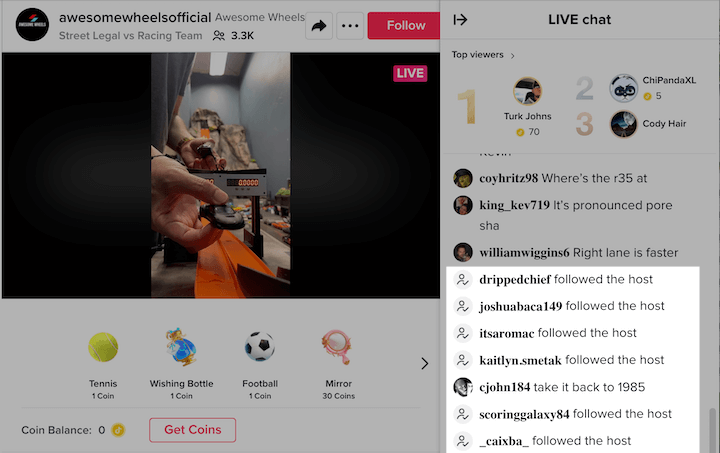
You can earn virtual gifts from viewers during live streams. These gifts can be converted into real money. It is a way to monetize your content while building a community.
Credit: teachable.com
Follower Requirements
Follower requirements on TikTok determine who can start a live stream. TikTok sets rules to keep the platform safe and fair. Knowing these rules helps creators plan their content strategy.
Minimum Followers Needed
To go live on TikTok, you must have at least 1,000 followers. This rule ensures users have a basic audience before broadcasting. TikTok wants live streams to reach enough people to be meaningful.
Also, you must be at least 16 years old to access live streaming. This age limit protects younger users from potential risks.
Exceptions And Updates
TikTok sometimes updates its live streaming rules. These changes may affect follower requirements or age limits. The platform may test new features with select users.
Some creators receive early access based on content quality or region. TikTok encourages safe and positive live streams by monitoring accounts closely.
Setting Up Live Streams
Setting up live streams on TikTok is simple and quick. It allows you to connect with your followers in real time. Live videos help build a stronger bond with your audience. You need to prepare a few things before going live.
Knowing how to start your live video and adjusting settings improves your stream quality. These steps make your live session smooth and enjoyable. Follow the guide below to set up your TikTok live stream.
How To Start A Live Video
Open the TikTok app on your phone. Tap the “+” button at the bottom center. Swipe to the “Live” tab next to “Video.” Enter a title for your live stream. Choose a clear and catchy title to attract viewers. Tap “Go Live” to start streaming immediately. Your followers will get a notification once you start.
Live Stream Settings
Before going live, check your camera and microphone. Ensure good lighting and a quiet environment. You can add filters or effects to enhance your video. Use the settings to manage comments during your live. Turn off comments if you want a distraction-free stream. Also, check your internet connection for smooth streaming. A stable connection reduces lag and disconnections.
Tips To Grow Followers Quickly
Growing followers on TikTok quickly takes smart work. Focus on creating content that people want to watch and share. Keep your videos short, clear, and fun. Post regularly to stay visible and attract more viewers. Use these tips to help your account grow fast.
Content Strategies
Post videos that are interesting and easy to understand. Use bright colors and good lighting to catch attention. Show your personality to connect with viewers. Share useful or funny content that makes people want to watch again. Keep your videos between 15 to 60 seconds for best results.
Engagement Techniques
Reply to comments to build a friendly community. Ask questions in your videos to invite answers. Encourage viewers to follow you for more content. Use clear calls to action like “Follow for tips” or “Watch next video.” Engage with other creators to reach new audiences.
Using Trends And Challenges
Join popular TikTok trends to get noticed quickly. Use trending sounds and hashtags in your videos. Take part in challenges that fit your style. Add your own twist to stand out from others. Trends change fast, so post new videos often to stay relevant.
Alternatives To Going Live Early
Starting to go live on TikTok needs a minimum number of followers. Some creators want to share live videos but do not meet the follower count. There are other ways to grow your audience and stay active without going live early. These methods help build your presence and get more followers over time.
Collaborations With Other Creators
Working with other TikTok creators can bring new viewers to your profile. Find creators with similar interests or styles. Make videos together or tag each other in posts. This exposes your content to their followers. It helps you reach more people without needing to go live. Collaborations build connections and trust with new audiences.
Using Tiktok Stories And Videos
Stories and regular videos keep your followers engaged every day. Post short clips that show your personality or skills. Use popular sounds and trends to attract attention. Stories offer a quick way to share updates and behind-the-scenes moments. These posts keep your profile active and interesting. Active profiles grow faster and may unlock live features sooner.
Credit: www.wordstream.com
Common Live Streaming Issues
Live streaming on TikTok can be exciting but sometimes tricky. Many users face common issues that stop their live videos. These problems can affect your streaming experience and audience engagement. Knowing how to handle them helps keep your live sessions smooth and enjoyable.
Troubleshooting Access Problems
Access problems often block users from going live on TikTok. TikTok requires at least 1,000 followers to start a live video. If you do not meet this, the live option will be unavailable. Account restrictions may also stop live access. Check if your account follows TikTok’s community rules. Verify your account details and update the app to the latest version. Restart your device to refresh the connection. These steps often fix access issues quickly.
Handling Technical Glitches
Technical glitches can disrupt your live streaming. Poor internet connection is a common cause. Use a strong Wi-Fi or mobile data signal. Close other apps to free up device resources. Low battery or overheating may cause the app to lag. Charge your device before going live. Clear the app cache to remove temporary files. If problems persist, reinstall the TikTok app. These actions improve streaming quality and reduce interruptions.
Monetizing Tiktok Live
Monetizing TikTok Live offers creators a chance to earn money directly from their viewers. Going live is more than sharing content; it’s about creating connections. TikTok provides tools that help users turn their live streams into income. Understanding these tools can help you grow your earnings steadily.
Gifts And Donations
Viewers can send virtual gifts during your live streams. These gifts cost real money and show support for your content. TikTok converts these gifts into Diamonds, a virtual currency. Creators can exchange Diamonds for real cash. The more engaging your stream, the more gifts you may receive. It encourages interactive and fun live sessions.
Building A Loyal Audience
Regularly going live helps build trust with viewers. Loyal followers return to watch and support your streams. Responding to comments and questions creates a strong bond. A loyal audience is more likely to send gifts and share your content. This community can grow your influence and income over time.

Credit: www.youtube.com
Frequently Asked Questions
How Many Followers Do You Need To Go Live On Tiktok?
You need at least 1,000 followers to unlock TikTok’s live streaming feature. This threshold helps ensure quality content and user engagement during live sessions.
Can New Tiktok Accounts Go Live Without Followers?
No, new TikTok accounts must reach 1,000 followers before going live. This rule prevents misuse and encourages authentic interactions on the platform.
Does Tiktok Have Age Restrictions For Live Streaming?
Yes, you must be at least 16 years old to go live on TikTok. Users aged 18+ can also send virtual gifts during live streams.
How To Increase Followers Quickly To Go Live On Tiktok?
Post engaging videos regularly, use trending hashtags, and interact with your audience. Consistency and creativity help grow your follower count faster.
Conclusion
Going live on TikTok needs at least 1,000 followers. This rule helps keep the platform safe and fun. Growing your followers takes time and effort. Share good content and engage with your audience. Once you reach the follower goal, start your live streams.
Live videos help you connect and build trust. Keep practicing and stay patient along the way. Soon, you will enjoy the benefits of going live. Just remember, every big TikTok creator started small.