Do you ever wonder who exactly is following your YouTube channel? Knowing your subscribers can give you a powerful edge.
When you understand who they are, you can create content that truly connects with them. This boosts your views, engagement, and growth. You’ll learn simple steps to check your YouTube subscribers easily. By the end, you’ll have the tools to know your audience better and make your channel thrive.
Ready to unlock the secrets of your subscribers? Let’s dive in!
Accessing Your Youtube Studio
Accessing YouTube Studio is the first step to see who subscribes to your channel. This platform gives you tools to manage your videos and view subscriber details. The process is simple and quick. Just follow the steps below to get started.
Signing In To Your Account
Open your web browser and go to youtube.com. Click the “Sign In” button at the top right corner. Enter your Google email and password linked to your YouTube channel. After signing in, you will see your YouTube homepage.
Navigating To Youtube Studio
Click your profile icon at the top right corner of the screen. A menu will appear with several options. Select “YouTube Studio” from this list. This will take you to the dashboard where you can manage your channel. Here, you can access subscriber information and other channel stats easily.

Credit: www.youtube.com
Locating The Subscribers List
Knowing who your YouTube subscribers are helps build a better connection. YouTube offers a simple way to see your subscribers list. This guide explains how to find that list fast. Follow these steps to check your subscribers on YouTube.
Opening The Dashboard
First, sign in to your YouTube account. Then click your profile icon at the top right. Select “YouTube Studio” from the menu that appears. This action opens your channel dashboard. The dashboard shows many details about your channel.
Finding The Recent Subscribers Section
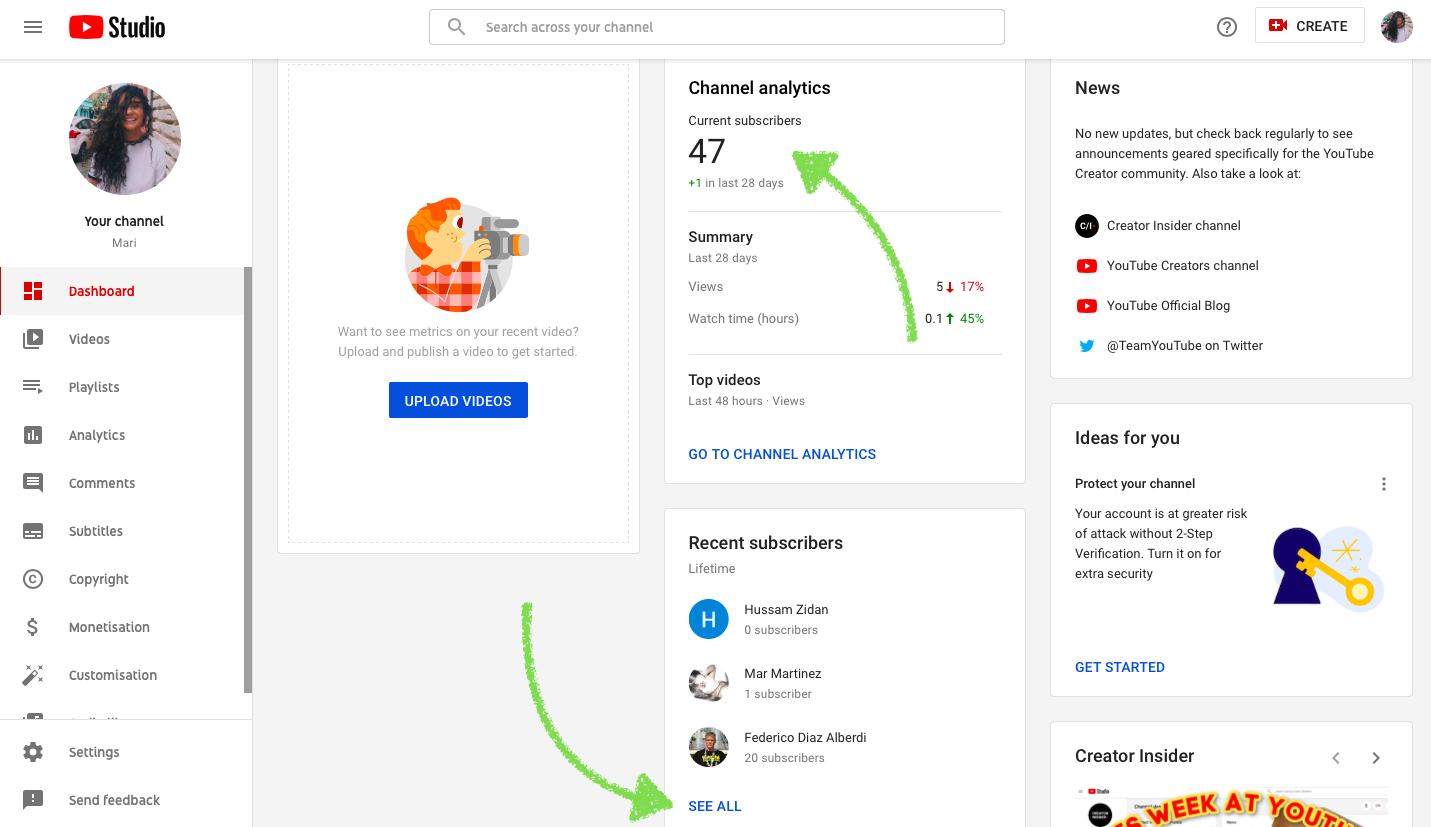
In the dashboard, scroll down a little. Look for the “Recent Subscribers” box on the right. This section shows your newest subscribers. Click “See All” to view the complete list. Here, you can explore who has subscribed to your channel.
Viewing Subscriber Details
Viewing subscriber details helps you know who supports your YouTube channel. It shows the people who enjoy your videos and want to see more. Knowing your subscribers helps create better content and build a stronger community.
You can see some information about your subscribers directly on YouTube Studio. This information includes their usernames and channel links. It helps you understand your audience better and engage with them.
Understanding Subscriber Visibility
Not all subscribers are visible to you. Some users keep their subscriptions private. This means their names do not appear on your subscriber list. Only subscribers who have their subscriptions public can be seen.
You can view up to 100 subscribers who have public subscriptions. This limit helps manage privacy and data use. Remember, new subscribers may take time to show up on your list.
Checking Subscriber Profiles
Click on a subscriber’s name to visit their profile. You can see their channel and the type of content they post. This helps you know your audience’s interests and preferences.
Some profiles include subscriber counts and recent videos. Use this to learn what your viewers like. Engaging with subscribers by commenting or following back can build a loyal fan base.

Credit: www.youtube.com
Using Filters And Sorting Options
Using filters and sorting options helps you manage your YouTube subscribers easily. These tools let you see your subscribers in different ways. You can arrange them by date or check their recent activity. This makes it simpler to understand your audience better.
Sorting By Subscription Date
YouTube lets you sort subscribers by the date they joined your channel. This shows who subscribed first and who came later. You can find your newest fans or see your oldest supporters quickly. Sorting by date helps track growth over time. It also helps plan content for different subscriber groups.
Filtering By Subscriber Activity
Filtering by subscriber activity shows you who watches or interacts with your videos often. This option highlights active followers who comment, like, or share your content. It helps find loyal viewers and engage with them more. Understanding active subscribers can improve your channel’s success. You can focus on content that your real fans enjoy the most.
Limitations To Subscriber Information
Knowing who your subscribers are on YouTube can help you create better content. Yet, YouTube limits the information you can see about your subscribers. These limits protect users’ privacy and control how much data is visible to creators.
Understanding these restrictions helps set the right expectations. It also shows why subscriber data may seem incomplete or unclear.
Privacy Settings Impact
Subscribers can choose to keep their subscriptions private. When they do, you cannot see their names on your subscriber list. This setting protects their identity and browsing choices.
Only subscribers with public subscriptions appear in your list. This means some fans stay hidden from your view.
Number Of Subscribers Shown
YouTube only shows up to 100 subscribers in your list. Even if you have thousands of subscribers, the list stops at 100.
This limit keeps the subscriber list manageable. It also means you might miss seeing some active fans.
Credit: klintmarketing.com
Tips To Increase Subscriber Visibility
Increasing the visibility of your YouTube subscribers helps build a stronger community. It also lets you understand who supports your channel. Knowing your subscribers can guide you to create better content. Here are some simple tips to help more subscribers show their support publicly.
Encouraging Public Subscriptions
Ask your viewers to keep their subscriptions public. This allows you to see who they are. Explain that public subscriptions help you connect with your audience. Remind them it is easy to change this setting in their account. A polite request often works well to encourage this.
Make a short video or mention it in your content. Tell subscribers how it helps you grow your channel. Keep the message clear and friendly. Avoid making it sound like a demand. Many subscribers will happily make their subscriptions public.
Engaging With Subscribers
Reply to comments and questions regularly. This shows you value your subscribers. Active engagement encourages more people to join and stay. Use your community tab to post updates and polls. This keeps your audience involved and interested.
Host live sessions or Q&A videos. This helps you connect directly with your viewers. When subscribers feel seen, they are more likely to stay public. Engagement builds trust and loyalty on your channel.
Frequently Asked Questions
How Can I See My Youtube Subscribers List?
To see your YouTube subscribers, go to YouTube Studio. Click “Dashboard,” then “Recent Subscribers. ” You can view subscribers who made their subscriptions public.
Can I Check Subscribers Who Keep Their Subscriptions Private?
No, YouTube does not allow viewing subscribers with private subscriptions. Only public subscriber information is visible on your YouTube Studio.
Why Can’t I See All My Youtube Subscribers?
You can only see subscribers who made their subscriptions public. Private subscribers remain hidden due to YouTube’s privacy policies.
How Often Does Youtube Update Subscriber Information?
YouTube updates subscriber data in real-time on YouTube Studio. You can check your latest subscriber activity anytime for current information.
Conclusion
Knowing who your YouTube subscribers are helps you create better content. Check your subscriber list often to understand your audience. Engage with your viewers by responding to comments and messages. Use this information to grow your channel naturally. Keep your content clear and interesting for your subscribers.
Watching your subscriber data helps you plan future videos. Stay active and connected to build a loyal community. Small steps lead to steady channel growth. Keep learning and adapting to your audience’s needs.