
Are you ready to take control of your online presence and finally delete your Facebook account? Whether you want to protect your privacy, reduce distractions, or simply start fresh, removing your account can feel overwhelming.
But don’t worry—this guide will walk you through every step in a clear and simple way. By the end, you’ll know exactly how to delete your Facebook account without any confusion or stress. Keep reading, because this decision could change how you experience social media—and your peace of mind.
Reasons To Delete Facebook
Many people think about deleting their Facebook account for different reasons. Some want more control over their personal data. Others aim to spend less time on social media. This section explains common reasons why people choose to delete Facebook.
Privacy Concerns
Facebook collects a lot of personal information. This data can be shared with advertisers and third parties. Some users feel uncomfortable with this level of data sharing. Deleting Facebook helps protect personal privacy and limits data exposure.
Reducing Digital Footprint
Every action on Facebook leaves a digital trace. Over time, this builds a large online profile. Some want to reduce their digital footprint for safety or personal reasons. Removing Facebook reduces the amount of personal data online.
Avoiding Distractions
Facebook can take up a lot of time each day. Notifications and posts distract from work, study, or family time. Deleting the account helps avoid these distractions. It allows more focus on real-life activities and goals.
Credit: www.businessinsider.com
Difference Between Deactivation And Deletion
Deciding to step away from Facebook involves understanding two key actions: deactivation and deletion. Both options pause your presence on the platform but work very differently. Knowing the difference helps you choose what fits your needs best.
What Deactivation Means
Deactivation temporarily hides your profile from others. Your name and photos disappear from most places on Facebook. Friends cannot find or contact you easily.
Your messages stay visible to others. You can reactivate your account anytime by logging back in. Facebook saves your data during deactivation. It is like a pause button, not a full stop.
What Deletion Means
Deletion removes your account permanently. All your data, posts, and photos get erased. You cannot recover anything after deletion.
Facebook takes some days to complete this process. During this time, you can cancel the deletion if you change your mind. After that, your profile disappears forever.
Choosing The Right Option
Pick deactivation if you want a break from Facebook. It keeps your information safe and lets you return easily. Use deletion if you want to leave Facebook completely.
Think about your future use before deciding. Deactivation suits short breaks. Deletion suits permanent exit.
Preparing To Delete Your Account
Deleting your Facebook account is a big step. It means saying goodbye to your posts, photos, and messages. Before you click delete, take time to prepare. This helps you keep important data and avoid problems later.
Backing Up Your Data
Save your photos, videos, and posts before deleting. Facebook lets you download a copy of your data. Go to settings, find “Your Facebook Information,” and select “Download Your Information.” Choose what you want to save. This way, you keep memories and important files safe.
Reviewing Connected Apps
Many apps use Facebook to log in. Check which apps are connected to your account. Visit the settings and open “Apps and Websites.” Remove apps you no longer use or trust. This step stops losing access to those apps after deleting your account.
Informing Contacts
Tell friends and family about your plan to delete Facebook. Share other ways to reach you, like email or phone. This helps keep your connections alive. It avoids confusion and missing important messages later.

Credit: www.avg.com
Step-by-step Guide To Delete Account
Deleting a Facebook account is a simple process. This guide helps you remove your profile step-by-step. Follow these clear instructions to complete the deletion easily.
Accessing Account Settings
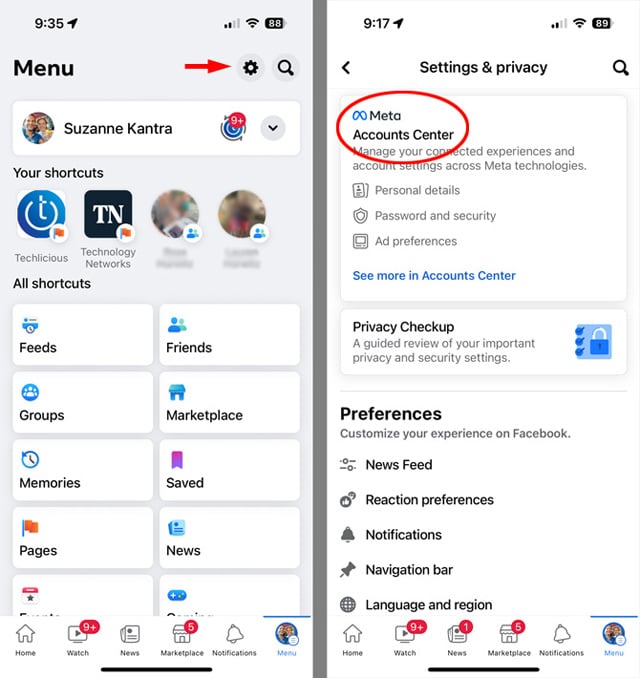
First, log into your Facebook account. Look for the small arrow icon at the top right corner. Click it to open a dropdown menu. Choose “Settings & Privacy” from the list. Then select “Settings” to enter the main account settings page.
Navigating To Delete Option
In the settings menu, find the “Your Facebook Information” tab on the left side. Click on it to open options related to your data. Scroll down and select “Deactivation and Deletion.” Choose “Delete Account” and then click “Continue to Account Deletion.”
Confirming Deletion
Facebook will ask you to confirm your choice. Read the warnings carefully before proceeding. Enter your password to verify your identity. Click “Delete Account” to finish the process. Your account will be scheduled for deletion.
What Happens After Deletion
Deleting your Facebook account is a big step. Many wonder what happens next. Understanding the process helps you prepare. It also shows how your data and access change over time. Below are key points about what happens after deletion.
Data Removal Timeline
Facebook does not delete your data immediately. It keeps your info for 30 days. During this period, you can cancel deletion. After 30 days, Facebook begins removing your data. Some data, like messages sent to friends, may stay longer. Full deletion can take up to 90 days from the start.
Access During Grace Period
During the first 30 days, you can log in anytime. Logging in cancels the deletion request. Your profile and content remain visible to others. After 30 days, you lose access to your account. You cannot log in or recover your data after this.
Effects On Messenger
Deleting Facebook also affects Messenger. You lose access to Messenger immediately. Your messages stay visible to others in their inboxes. You cannot send or receive new messages. Messenger contacts cannot reach you once deletion starts.
Tips For Maintaining Privacy Post-deletion
Deleting your Facebook account is a big step toward protecting your privacy. But your online presence does not disappear completely. You need to take extra steps to keep your information safe after deletion. These tips help you control what others see and protect your personal data.
Managing Online Presence
Review your online footprint regularly. Search your name on search engines. Identify posts, photos, or comments linked to you. Request removal or contact website owners if needed. Clear out old accounts you no longer use. This reduces the risk of personal information being exposed.
Adjusting Other Social Media Settings
Check privacy settings on all social networks. Limit who can see your posts and profile details. Turn off location sharing to avoid revealing your whereabouts. Remove connections to apps or websites you no longer trust. Use strong passwords and update them often.
Using Privacy Tools
Use browser extensions to block trackers and ads. Consider a virtual private network (VPN) for safer browsing. Enable two-factor authentication on all accounts. Regularly clear your cookies and browsing history. These tools help reduce digital footprints and protect your data.
Credit: www.techlicious.com
Frequently Asked Questions
How Do I Permanently Delete My Facebook Account?
To permanently delete your Facebook account, go to Settings > Your Facebook Information > Delete Account. Confirm your choice, and Facebook will remove your data after 30 days.
Can I Recover My Facebook Account After Deletion?
Yes, you can recover your account within 30 days of deletion by logging in. After 30 days, your data is permanently deleted.
What Happens To My Facebook Data After Deletion?
Facebook deletes your data after 30 days of account deletion. Some information may remain in backups but is not accessible.
How Long Does Facebook Take To Delete An Account?
Facebook takes up to 30 days to delete your account fully. During this period, your account is deactivated and hidden from others.
Conclusion
Deleting your Facebook account is simple with clear steps. Take time to save any important data first. Once deleted, your profile and information will no longer appear. This helps protect your privacy and reduce distractions. Remember, you can always create a new account later if needed.
Stay safe online by managing your social media wisely. Your digital life is in your hands.


