Are you ready to take control of your online presence and delete your Facebook account for good? Whether you’re looking to protect your privacy, reduce distractions, or simply move on from social media, knowing how to delete your Facebook account is the first step.
In this guide, you’ll discover clear, easy steps to permanently remove your account without any confusion. Keep reading, and by the end, you’ll feel confident and empowered to make the change you want.
Types Of Facebook Account Removal
Facebook offers two main ways to remove your account. You can either deactivate it or delete it. Both options stop your profile from appearing to others. Each option has different effects on your data and access. Understanding these differences helps you choose the right action.
Difference Between Deactivation And Deletion
Deactivation hides your profile and information. Friends cannot see your timeline or search for you. You can reactivate your account anytime by logging back in. Your messages may still be visible to others.
Deletion removes your account permanently. Facebook deletes your profile, photos, and posts. You cannot regain access after deletion. It takes up to 30 days to complete the process fully.
What Happens After Deletion
After deletion starts, your profile disappears from Facebook. Your data stays on Facebook servers for a short time. This allows you to cancel deletion if you change your mind.
After 30 days, Facebook removes your data permanently. Your messages may still be visible to others. Facebook keeps some data for legal reasons and security.
Credit: www.techlicious.com
Preparing To Delete Your Facebook Account
Deleting your Facebook account is a big step. It means losing access to all your posts, photos, and messages. Preparing well helps avoid surprises after deletion. Take time to save what matters and check your connected apps.
Backing Up Your Data
Facebook lets you download your data before deleting your account. This backup includes photos, posts, and messages. Go to settings and find “Your Facebook Information.” Select “Download Your Information.” Choose the data you want and the format. Click “Create File” and wait for Facebook to prepare it. Download the file to your computer. This way, you keep your memories safe.
Reviewing Connected Apps And Services
Many apps use Facebook to log in. Deleting your account may block access to these apps. Check the list of apps connected to your Facebook. Go to settings, then “Apps and Websites.” Remove or update apps that rely on Facebook login. Switch to a new login method if possible. This step ensures you don’t lose access to important services.
Steps To Delete Your Facebook Account
Deleting a Facebook account is a clear process. Follow simple steps to remove your profile permanently. This guide explains each step in detail.
Accessing Account Settings
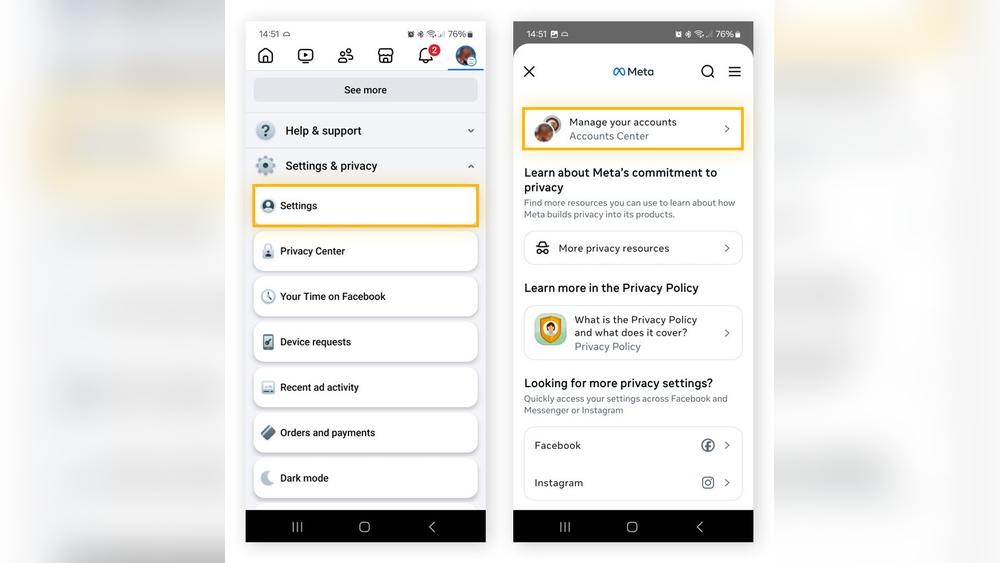
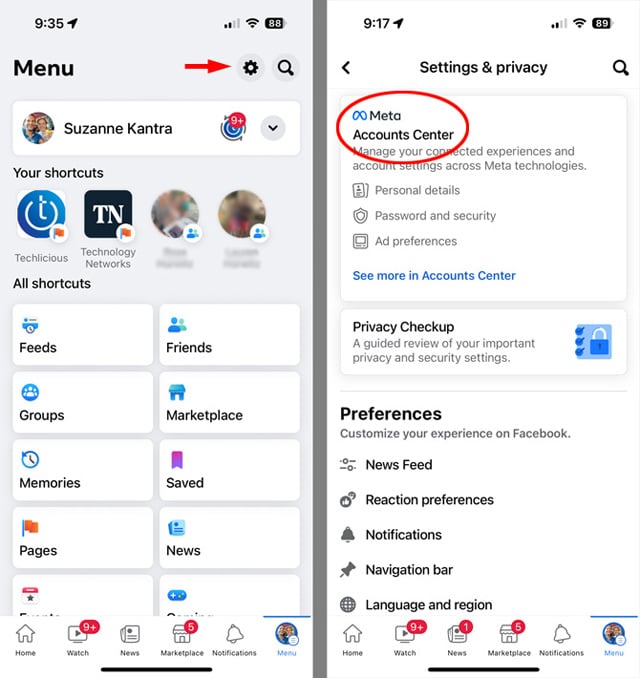
First, log in to your Facebook account. Click the small arrow at the top right corner. Select “Settings & Privacy” from the dropdown menu. Then click “Settings” to open account options.
Navigating To Delete Account Option
In the Settings menu, find “Your Facebook Information” on the left side. Click on “Deactivation and Deletion.” Choose the option “Delete Account” and click “Continue to Account Deletion.”
Confirming Account Deletion
Facebook will ask to confirm your decision. Enter your password to verify your identity. Click “Delete Account” to finalize the process. Your account will be scheduled for deletion.

Credit: www.avg.com
After Deleting Your Account
After deleting your Facebook account, it is important to understand what happens next. The process does not end the moment you click delete. Facebook takes time to remove your data completely. Some information may still be visible for a short period.
Data Removal Timeline
Facebook starts deleting your data right away. It can take up to 90 days to erase everything. Copies of your data may remain in backup storage. These backups are only for recovery or legal reasons. During this time, your account is not accessible to others.
Reactivation Window
Facebook offers a short period to change your mind. You have 30 days from the deletion request to reactivate. Logging in during this time cancels the deletion. After 30 days, your account and data are gone forever. No recovery is possible after this window.
What Remains Visible To Others
Some information may still show up after deletion. Messages you sent to friends remain in their inbox. Comments on other people’s posts might stay visible. Your name may appear in their chat history. Other people cannot see your profile or timeline.
Troubleshooting Common Issues
Deleting a Facebook account can sometimes bring up unexpected issues. These problems can stop the deletion process or create confusion. Knowing how to handle common troubles helps save time and effort. Below are solutions for some frequent problems users face.
Unable To Delete Account
Sometimes, the delete option does not work. This can happen if you are not logged in properly. Check your internet connection and try again. Clear your browser cache and cookies. Using an updated browser helps too. Facebook may block deletion if you have ongoing ads or payments. Cancel these before deleting. Also, make sure your account meets Facebook’s rules for deletion.
Recovering A Deleted Account
Facebook lets you recover your account within 30 days of deletion. Log in using your email and password. Click “Cancel Deletion” to keep your account active. After 30 days, recovery is not possible. Make sure to act quickly if you change your mind. Download your data before deleting to avoid losing important information.
Handling Linked Accounts
Facebook accounts may link to other apps or services. These links can cause issues during deletion. Disconnect third-party apps from Facebook settings first. Check if your Facebook login is connected to other sites. Update login details on these sites to avoid access problems. Removing linked accounts ensures smooth deletion and avoids future login troubles.
Credit: www.businessinsider.com
Frequently Asked Questions
How Do I Delete My Facebook Account Permanently?
To delete your Facebook account permanently, go to Settings, select “Your Facebook Information,” then click “Deactivation and Deletion. ” Choose “Delete Account,” confirm your password, and follow the prompts. Your account will be deactivated for 30 days before permanent deletion.
Can I Recover My Facebook Account After Deletion?
Yes, you can recover your Facebook account within 30 days of deletion. Simply log in using your credentials. After 30 days, the account and all data will be permanently deleted and cannot be recovered.
What Happens To My Data After Deleting Facebook?
After deleting your Facebook account, your data is permanently removed from Facebook’s servers after 30 days. Some information may remain in backup copies for a limited period but will be fully erased thereafter.
How To Delete My Facebook Account Without Losing Messages?
Facebook deletes your entire account, including messages. To keep messages, save or screenshot conversations before deleting. Alternatively, you can deactivate your account to keep messages accessible to friends.
Conclusion
Deleting a Facebook account is simple and quick. Follow the steps carefully to avoid mistakes. Remember to save any important data before you start. Your privacy and control over information matter most. Taking time to decide helps avoid regrets later.
Keep this guide handy for easy reference. You can always create a new account if needed. Staying informed makes managing your online presence easier.