Have you ever found a YouTube clip you want to save and watch anytime, even without internet? Maybe it’s a funny moment, a helpful tutorial, or a favorite music video.
Knowing how to download a YouTube clip puts that power right in your hands. You’ll discover simple, safe ways to grab those videos quickly. By the end, you’ll be ready to keep your favorite clips forever—no stress, no hassle. Keep reading, and let’s make it happen!
Choosing The Right Tool
Choosing the right tool to download a YouTube clip is important. The tool you pick affects the quality, speed, and ease of the download. Some tools work better on certain devices or browsers. Others offer extra features like video editing or format options. This guide helps you understand the main types of tools available.
Online Downloaders
Online downloaders work directly in your web browser. No need to install any software. You just paste the YouTube link and start the download. These tools are quick and easy for one-time use. They often support multiple video formats. But they may have limits on video length or quality. Also, watch out for ads or pop-ups.
Desktop Software
Desktop software offers more power and options. You download and install the program on your computer. These apps often support batch downloads and high-quality videos. They let you choose video or audio formats. Some include editing features for trimming clips. Desktop software works well for frequent downloads or large files.
Browser Extensions
Browser extensions add download buttons directly on YouTube pages. They save time by letting you download with one click. Extensions fit well with Chrome, Firefox, and other browsers. They usually support multiple formats and quick downloads. Keep extensions updated for security and better performance. Some extensions may not work if YouTube changes its site.
Mobile Apps
Mobile apps help you download clips on smartphones and tablets. They provide a simple way to save videos for offline viewing. Many apps support popular video formats and resolutions. Look for apps that work on your device’s operating system. Some apps may require extra permissions or settings changes. Mobile apps are great for downloads on the go.
Credit: www.businessinsider.com
Finding The Youtube Clip
Finding the YouTube clip is the first step to download it. You need to know exactly which part of the video you want. This helps to save time and get the right content. The process is simple if you follow the right steps.
Locating The Video Url
Open YouTube and find the video you want. Look at the address bar on top of your browser. The URL is the web address that starts with https://www.youtube.com. Copy this link. It is essential to have the correct URL to download the clip.
Selecting The Clip Timestamp
Play the video and find the start time of your clip. Note the minutes and seconds where the clip begins. Do the same for the end time. These timestamps tell the downloader which part to save. Precise timestamps help get only the clip you need.
Step-by-step Download Process
Downloading a YouTube clip can be simple with the right steps. This guide breaks down the process into clear methods. Choose the one that fits your device and needs. Follow each step carefully to save your favorite videos quickly.
Using Online Downloaders
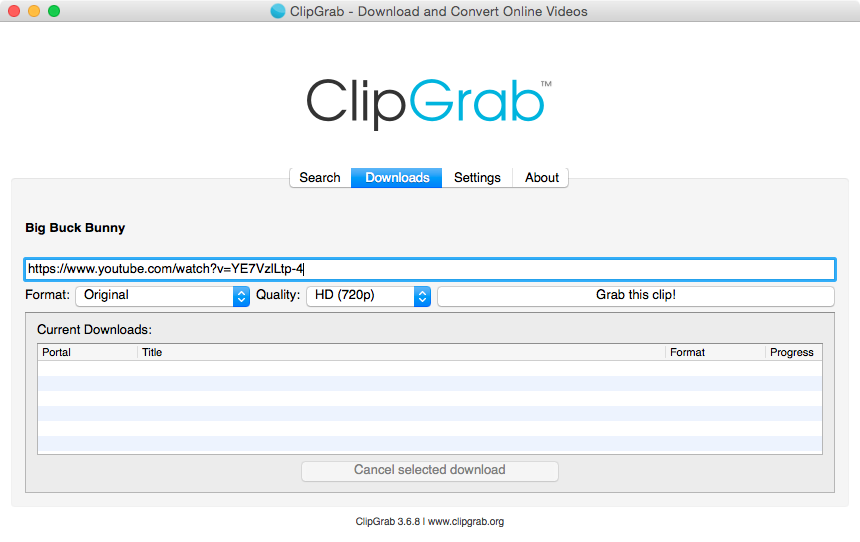
Find a trusted online downloader website. Copy the URL of the YouTube clip you want. Paste the link into the downloader’s input box. Select the video quality or format you prefer. Click the download button. Wait a few seconds for the file to be ready. Save the video to your device folder.
Using Desktop Software
Download and install a desktop video downloader. Open the software and paste the YouTube clip URL. Choose the output format like MP4 or MP3. Set the download location on your computer. Click the start or download button. The software will save the video to your chosen folder. Open the file to watch offline anytime.
Using Browser Extensions
Install a browser extension for video downloading. Open the YouTube clip in your browser. The extension will show a download button near the video. Click the button and pick the format or quality. The video will download directly to your computer. Check your browser’s download folder to find it.
Using Mobile Apps
Download a video downloader app from your app store. Open the app and enter the YouTube clip URL. Select the desired video quality or format. Tap the download button to start saving. Wait for the app to finish downloading. Find the video in your phone’s gallery or app folder.
Credit: clipgrab.org
Choosing Video Quality And Format
Choosing the right video quality and format is important when downloading a YouTube clip. It affects the file size, playback, and compatibility with your device. Picking the best option ensures smooth viewing and saves storage space.
Many tools offer multiple formats and resolutions. Understanding these choices helps you download the clip that fits your needs. Some formats focus on quality, others on size or device support.
Common Formats
MP4 is the most popular format. It works on almost all devices and players. WebM and AVI are less common but still useful for certain devices. MKV offers high quality but creates larger files. Choose the format that your device supports easily.
Resolution Options
Resolution means the video’s sharpness and detail. Higher resolution means clearer video but bigger file size. Common options include 360p, 720p, and 1080p. Choose 360p for small screens and slow internet. Pick 720p or 1080p for better quality and bigger screens.
Audio-only Downloads
Sometimes, you only need the sound. Audio-only downloads save space and work well for music or podcasts. Formats like MP3 and M4A are popular. They play on most devices and have good sound quality. This option is quick and easy for audio files.
Editing And Saving Clips
After downloading a YouTube clip, editing and saving it properly is important. This step helps you keep only the part you want. It also makes the clip easier to use on different devices. Basic editing tools can trim, convert, and save clips fast.
Trimming The Video
Trimming cuts the clip to the right length. Use simple video editors or online tools for this task. Select the start and end points carefully. Removing unwanted parts keeps your clip clear and focused. This process saves space and makes the clip easier to share.
Converting Formats
Converting changes the clip to a format your device supports. MP4 is the most popular and widely accepted format. Other common formats include AVI, MOV, and WMV. Use free converters to change the file type quickly. This step ensures smooth playback on phones, tablets, and computers.
Saving To Devices
Save the edited clip to your device for easy access. Choose a folder where you can find the clip later. Use external storage like USB drives or SD cards if needed. Backing up clips prevents accidental loss. Organized saving helps you manage your video collection better.
Legal And Ethical Considerations
Downloading YouTube clips may seem easy, but it involves legal and ethical issues. Understanding these rules helps avoid trouble and respects creators’ rights. This section explains key points about copyright, fair use, and respecting content creators.
Copyright Rules
Most YouTube videos are protected by copyright law. This means the creator owns the content and controls its use. Downloading or sharing videos without permission can break these laws. Always check if the video allows downloads or reuse. Respect copyright to avoid legal problems.
Fair Use Guidelines
Fair use lets people use parts of copyrighted content in some cases. This includes commentary, teaching, or news reporting. The use must be limited and not harm the creator’s earnings. Using a small clip with credit may be fair use. Still, it is best to be cautious and understand the rules well.
Respecting Content Creators
Content creators work hard on their videos. Downloading clips without permission can hurt their views and income. Respecting creators means asking for permission or using official download options. Supporting creators helps them continue making good content. Respect builds a positive online community.
Troubleshooting Common Issues
Downloading YouTube clips can sometimes cause issues. These problems can stop the download or lower the video quality. Understanding common errors helps fix them fast. This section covers typical troubles and how to solve each one.
Download Failures
Sometimes the download stops before it finishes. This can happen due to slow internet or server errors. Check your connection speed first. Try restarting the download tool or your device. Clearing the browser cache can also help. Avoid running many downloads at once.
Quality Problems
Videos may download in low quality or pixelate. This happens if the tool defaults to a low resolution. Choose a higher quality option before downloading. Some clips have limited quality available. Make sure the video source is HD for better results.
Tool Compatibility
Not all download tools work on every device or browser. Some tools need updates to run correctly. Check if your software is the latest version. Use tools that match your operating system. Testing different tools can find one that fits your needs.

Credit: www.youtube.com
Frequently Asked Questions
How Can I Download A Youtube Clip Easily?
You can download a YouTube clip using online tools or software. Copy the video URL, paste it into a downloader, and select the clip duration to save the segment you want. This method is quick, safe, and requires no technical skills.
Are Youtube Clip Downloaders Safe To Use?
Most reputable YouTube clip downloaders are safe if used properly. Avoid suspicious websites to prevent malware risks. Always use trusted tools with good reviews to ensure your device stays secure during the download process.
Can I Download Youtube Clips On Mobile Devices?
Yes, you can download YouTube clips on mobile devices using apps or mobile-friendly websites. Ensure the app is trusted and check permissions before use. This allows you to save and watch clips offline conveniently.
Is It Legal To Download Youtube Clips?
Downloading YouTube clips is legal only for personal use if the content is not copyrighted or if you have permission. Avoid redistributing or using clips commercially without proper rights to prevent copyright infringement.
Conclusion
Downloading a YouTube clip can be simple and quick. Choose the right tool and follow the steps carefully. Always respect copyrights and use clips fairly. Save your favorite moments to watch anytime offline. Practice these tips to get the best results.
Enjoy your videos without an internet connection. Keep your downloads safe and organized for easy access. This way, you control what you watch and when.