Are you curious about how many people are following your YouTube channel? Knowing your subscriber count is key to understanding your audience and growing your presence.
But sometimes, finding that number isn’t as simple as it sounds. You’ll discover easy steps to see your subs on YouTube quickly and clearly. By the end, you’ll have the tools to track your progress and keep your channel moving forward.
Keep reading to unlock the secrets behind your subscriber numbers!
Check Subscribers On Youtube Studio
Checking your subscribers on YouTube Studio helps you understand your audience better. You can see how many people follow your channel. Also, you get details about new subscribers and their activity. This knowledge helps you create content your viewers enjoy.
Accessing Youtube Studio
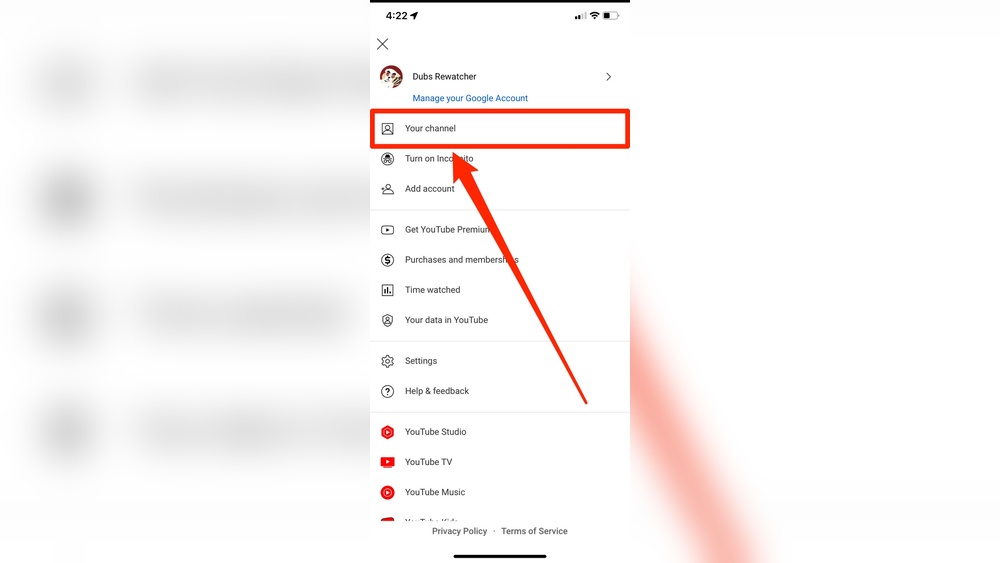
First, go to the YouTube website and sign in. Click your profile picture at the top right corner. Select “YouTube Studio” from the dropdown menu. This opens the main dashboard where you manage your channel.
Navigating To The Subscribers Section
On the left sidebar, find and click “Analytics.” Inside Analytics, look for the “Audience” tab at the top. This tab shows subscriber information and viewer data. Scroll down to find the “Recent Subscribers” section.
Viewing Recent Subscribers
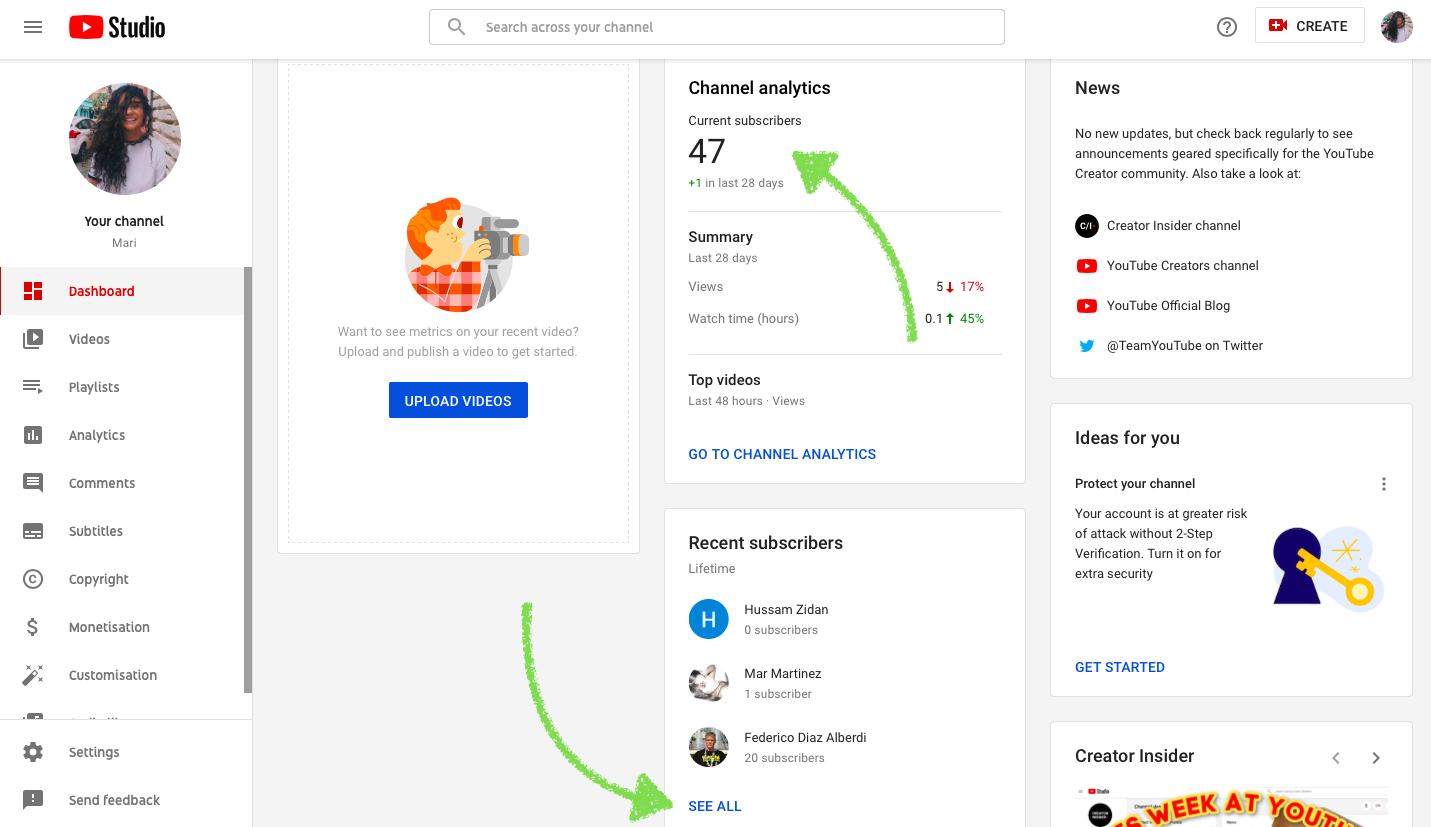
The “Recent Subscribers” list shows who subscribed to your channel. You can see their names and subscription dates. Some subscribers may choose to keep their subscriptions private. You only see public subscriptions here.
Use Youtube Mobile App To Track Subs
Using the YouTube mobile app is an easy way to track your subscribers on the go. It helps you stay updated without needing a computer. This method is quick and simple, making it perfect for creators who want fast access to their channel stats.
Opening The Youtube Studio App
First, download the YouTube Studio app from your app store. Open the app and sign in with your YouTube account. This app is designed to give creators detailed insights about their channels. It’s a must-have tool for managing your subscribers on mobile.
Finding Subscriber Information
After logging in, tap the menu icon at the bottom. Select “Dashboard” to see a quick overview. Scroll down to find the “Recent Subscribers” section. Here, you can see who subscribed to your channel recently. This helps you know your audience better.
Checking Subscriber Growth On Mobile
To track your subscriber growth, go to the “Analytics” tab. Look for the “Subscribers” metric to see changes over time. The app shows graphs and numbers clearly. This makes it easy to understand how your channel grows each day.
Analyze Subscriber Data With Analytics
Analyzing your subscriber data helps you understand your YouTube audience better. It shows who your subscribers are and how they interact with your content. This knowledge guides you to create videos that your viewers enjoy.
Accessing Analytics Dashboard
Open YouTube Studio by clicking your profile icon. Select “YouTube Studio” from the menu. On the left sidebar, click “Analytics.” This opens the dashboard with all your channel data.
Use filters to see specific time frames or video performance. The dashboard updates in real-time. It gives a quick view of your subscriber count and growth.
Interpreting Subscriber Metrics
Look at the “Subscribers” tab for key numbers. It shows gained and lost subscribers daily. Pay attention to spikes or drops in these numbers.
Check watch time and views from subscribers. These metrics tell if subscribers watch your videos fully. High watch time means your content is engaging.
Identifying Subscriber Trends
Observe changes over weeks or months. Note which videos bring more subscribers. Find patterns in content type, length, or upload time.
See if subscriber growth matches video uploads. Identify days with higher subscriber activity. Use this data to plan future content and upload schedules.

Credit: www.tastyedits.com
Third-party Tools For Subscriber Tracking
Third-party tools help track YouTube subscribers outside the platform. They offer detailed insights and real-time updates on your channel growth. These tools simplify monitoring your subscriber count over time.
Many creators use external tools to see trends and compare their progress. They show subscriber changes more clearly than YouTube’s native analytics. This makes it easier to plan content and grow your audience.
Popular Subscriber Tracking Tools
Several tools stand out for tracking YouTube subscribers effectively. Social Blade shows live subscriber counts and historical data. Vidooly offers in-depth analytics and competitor comparisons. TubeBuddy provides subscriber tracking along with many other channel management features.
Benefits Of Using External Tools
External tools give you detailed subscriber graphs and alerts. They track changes as they happen, helping you react quickly. These tools also compare your channel with others in your niche. You get a better understanding of your audience and growth patterns.
How To Connect Tools With Your Channel
Most tools require simple sign-in using your Google account. You authorize them to access your YouTube data safely. After connecting, the tool gathers subscriber information automatically. No technical skills are needed, and setup takes only a few minutes.
Tips To Increase Subscriber Engagement
Increasing subscriber engagement helps grow a loyal audience. It boosts video views and channel activity. Engaged subscribers are more likely to share and comment. Below are simple tips to keep your audience interested and active.
Creating Consistent Content
Post videos regularly to build trust with viewers. Choose a schedule you can keep, like once a week. Consistency helps subscribers know when to expect new content. Stick to topics your audience enjoys to keep them coming back. Quality matters, but regular uploads create a strong habit for viewers.
Engaging With Your Audience
Reply to comments on your videos to show you care. Ask questions in videos to encourage viewers to comment. Use polls or community posts to gather opinions. Make viewers feel part of your channel’s journey. This connection can increase their interest and loyalty.
Promoting Your Channel Effectively
Share your videos on social media to reach more people. Join groups where your video topics fit and share your content. Use clear, catchy titles and thumbnails to attract clicks. Collaborate with other creators to expose your channel to new audiences. Promotion helps bring more subscribers who will engage with your videos.
Credit: klintmarketing.com

Credit: www.youtube.com
Frequently Asked Questions
How Can I See My Subscribers On Youtube?
To see your subscribers, go to YouTube Studio. Click on the “Audience” tab. You’ll find a list of recent subscribers there.
Can I View All My Youtube Subscribers?
YouTube only shows subscribers who have chosen to make their subscriptions public. Private subscribers will not be visible to you.
Where Is The Subscribers List On Youtube Studio?
In YouTube Studio, click “Analytics,” then go to the “Audience” tab. Scroll down to find the “Recent Subscribers” list.
How Often Does Youtube Update Subscriber Info?
YouTube updates subscriber data every 48 hours. Subscriber counts may not reflect real-time changes immediately.
Conclusion
Tracking your YouTube subscribers helps you grow your channel. Open YouTube Studio to see your subscriber count easily. Check the Subscribers tab for detailed info. Stay updated regularly to understand your audience better. Knowing who subscribes guides your content decisions well.
Keep engaging with viewers to build a strong community. Watching your subs can motivate you to create more. Simple steps like these make managing your channel clear. Start checking your subscribers today and watch your channel progress.