Have you ever found a YouTube video you want to save and watch anytime, even without internet? Knowing how to download YouTube videos can make that possible.
Whether it’s for your favorite music, tutorials, or funny clips, having them offline gives you freedom and convenience. You’ll discover simple, safe, and effective ways to download YouTube videos quickly. Keep reading, and by the end, you’ll have all the tools you need to build your own video library in no time.
Credit: linux.how2shout.com
Choose The Right Tool
Choosing the right tool to download YouTube videos is important. The tool affects how easy and fast the process will be. It also impacts the video quality and safety. Different tools offer different features. Some work better for certain devices or needs. This guide helps you pick the best option.
Free Vs Paid Downloaders
Free downloaders are easy to use and cost nothing. They work well for simple downloads. But they may have limits on speed or video quality. Ads can appear and interrupt your process. Paid downloaders offer more features. They often support higher quality and faster downloads. Some include extra tools like video converters. Choose based on how often you download and your needs.
Browser Extensions
Browser extensions add download options directly in your web browser. They are quick to install and use. No need to open another app. Extensions often support popular browsers like Chrome or Firefox. They allow downloads with a single click. Some may have limited formats or qualities. Be careful to download extensions from trusted sources only.
Mobile Apps
Mobile apps let you download videos right on your phone or tablet. They are handy for watching offline on the go. Many apps support multiple formats and resolutions. Some apps also let you manage and organize your downloads. Check app reviews and ratings before downloading. Make sure the app is safe and fits your device.
Check Video Quality Options
Checking video quality options helps you get the best viewing experience. It ensures your downloaded video matches your needs. You can choose based on your device and internet speed. Let’s explore the key factors to consider.
Resolution Choices
Resolution defines the sharpness of your video. Higher resolutions like 1080p or 4K offer clear and detailed images. Lower resolutions such as 480p or 360p save space and load faster. Choose a resolution that fits your screen size and storage capacity. Remember, larger files take more time to download.
Format Compatibility
Video formats affect how you play the file on your device. Common formats include MP4, AVI, and WEBM. MP4 works well on most devices and apps. AVI might need special players. WEBM is useful for web use but less supported on some devices. Pick a format that matches your playback device for smooth viewing.
Step-by-step Download Process
Downloading YouTube videos is simple with the right steps. Follow this clear guide to save videos quickly. This step-by-step process works for most download tools and websites.
Each step is easy to follow. You do not need special skills. Just a few clicks and your video is ready for offline viewing.
Copy Video Url
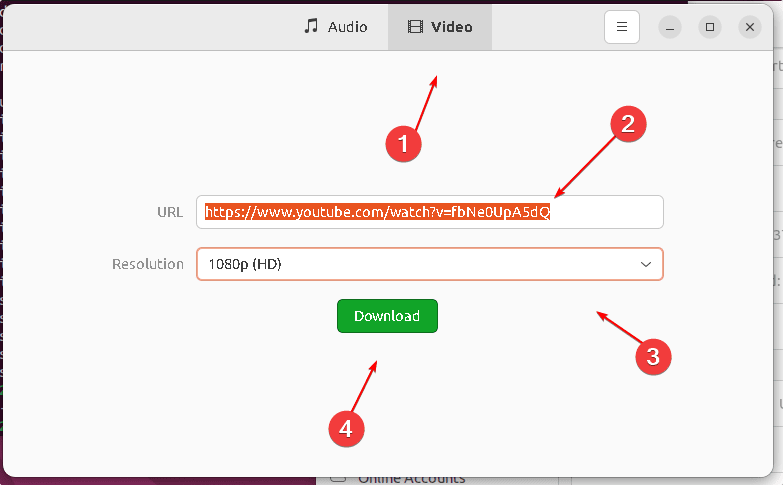
Start by opening the YouTube video you want. Look at the address bar on your browser. Highlight the full URL link. Right-click and choose “Copy” or press Ctrl+C on your keyboard.
This link is the key to start the download. Make sure you copy the entire URL without missing any part.
Paste And Select Settings
Go to your chosen YouTube downloader website or app. Find the box where you can paste the URL. Right-click and select “Paste” or press Ctrl+V.
Next, pick your download options. Choose the video quality, such as 720p or 1080p. You can also select the file format like MP4 or MP3 if you want audio only.
Start The Download
After setting your preferences, click the download button. The tool will begin fetching the video from YouTube. Wait a few moments as it processes your request.
Once ready, the file will save to your device. Check your downloads folder to find your video. Now you can watch it anytime without internet.
Download Videos On Mobile Devices
Downloading YouTube videos on mobile devices lets you watch offline anytime. This saves data and helps in places with weak internet. Both Android and iOS devices offer easy ways to save videos directly to your phone.
Using Android Apps
Several Android apps allow downloading YouTube videos quickly. Apps like TubeMate and VidMate are popular choices. Download and install the app from a trusted source. Open the app and search for the video you want. Tap the download button and choose the quality. The video will save to your device’s gallery or folder. Check the app’s settings to manage downloads easily.
Using Ios Apps
iOS apps have more restrictions but still offer solutions. Documents by Readdle is a reliable app for downloads. Install the app from the App Store. Use its built-in browser to visit a YouTube downloader website. Paste the video link and select download quality. The video saves inside the app’s storage. Move the video to your Photos app for easy access. This method keeps downloads organized and secure.
Save Videos For Offline Viewing
Saving YouTube videos for offline viewing lets you watch content anytime. It helps when you have no internet or want to save data. Offline videos can be watched on your phone or tablet without interruptions. This feature is useful for travelers, students, and anyone on the go.
Using Youtube’s Offline Feature
YouTube offers a built-in option to save videos offline. It works on the mobile app for Android and iOS. Tap the download button below the video to save it. You can choose the video quality before downloading. The saved video stays in your library for a set time. You need the YouTube app and a stable internet connection to download.
This feature is free but may not be available for all videos. Some videos have restrictions due to copyright rules. Videos saved offline can only be watched inside the YouTube app. You cannot share or export these files to other apps.
Third-party App Solutions
Third-party apps can also download YouTube videos for offline use. These apps offer more flexibility in saving and sharing videos. Some allow conversion to different formats like MP4 or MP3. You can save videos to your device storage or SD card.
Be careful when choosing third-party apps. Many are against YouTube’s terms of service. Some apps may contain ads or malware. Always use trusted sources and check user reviews. Remember to respect copyright laws and only download videos you have rights to save.
Troubleshoot Common Issues
Troubleshooting common issues helps you download YouTube videos smoothly. Problems may occur during downloading. These problems can stop or slow the process. Knowing how to fix them saves time and frustration.
Download Failures
Download failures happen often. They may occur due to bad internet or server issues. Check your internet connection first. Restart your router if needed. Try downloading the video again. If the problem persists, clear your browser cache. Sometimes, the download tool may be outdated. Update the tool or app to the latest version. Certain videos may have restrictions. These restrictions block downloads. Use another video or tool if possible.
Slow Download Speeds
Slow speeds make downloads take longer. This can be due to weak internet signals. Move closer to the Wi-Fi router or use a wired connection. Close other apps or tabs that use bandwidth. Download during off-peak hours when internet traffic is low. Check if your device has enough storage space. Sometimes, the download server is slow. Try a different downloader or server option. Restart your device to clear temporary issues.
Stay Legal And Safe
Downloading YouTube videos can be helpful, but staying legal and safe is important. Many people do not realize that not all videos can be downloaded freely. Some videos have copyright rules that protect the creator’s work. Following these rules avoids trouble and respects the content creators.
Safety also matters. Downloading videos from unknown sites can bring viruses or malware. These can harm your device or steal your information. Being careful helps keep your computer and personal data secure.
Copyright Considerations
YouTube videos often have copyright protection. This means you cannot copy or share videos without permission. Some videos allow downloads if the creator says yes. Others are only for streaming and cannot be saved.
Use videos only for personal use unless you have rights. Avoid using downloaded content for profit or public sharing. Respect the creator’s work to avoid legal problems. Always check YouTube’s terms and copyright laws before downloading.
Avoiding Malware
Many websites offer video downloads, but not all are safe. Some sites hide malware in their download links. Malware can damage your device or steal your private data. Avoid clicking on suspicious ads or pop-ups.
Use trusted tools or websites with good reviews. Keep your antivirus software updated. Scan any downloaded files before opening them. Staying cautious helps protect your device and information.
Credit: www.youtube.com
Credit: www.businessinsider.com
Frequently Asked Questions
How Can I Download Youtube Videos Legally?
You can download YouTube videos legally by using YouTube Premium. It allows offline viewing within the app. Avoid third-party tools that violate YouTube’s terms to stay compliant and safe.
What Are The Best Tools To Download Youtube Videos?
Top tools include 4K Video Downloader, Y2Mate, and ClipGrab. These tools support multiple formats and resolutions. Always choose trusted software to avoid malware and ensure quality downloads.
Can I Download Youtube Videos On My Mobile Device?
Yes, YouTube Premium users can download videos on mobile apps for offline viewing. Some apps and browsers also support downloads, but ensure they comply with YouTube’s policies to avoid issues.
Is Downloading Youtube Videos Free Or Paid?
Downloading videos via YouTube Premium requires a subscription fee. However, many third-party tools offer free downloads but may have limitations or risks. Choose based on your needs and legal considerations.
Conclusion
Downloading YouTube videos can be simple and quick. Choose a reliable tool and follow clear steps. Always respect copyright rules and use videos fairly. Save videos to watch offline anytime you want. Enjoy your favorite content without internet worries. Stay safe by avoiding suspicious websites.
Keep your device secure with trusted downloads. Now, you can easily keep videos for later use. Simple, fast, and helpful for daily video needs.