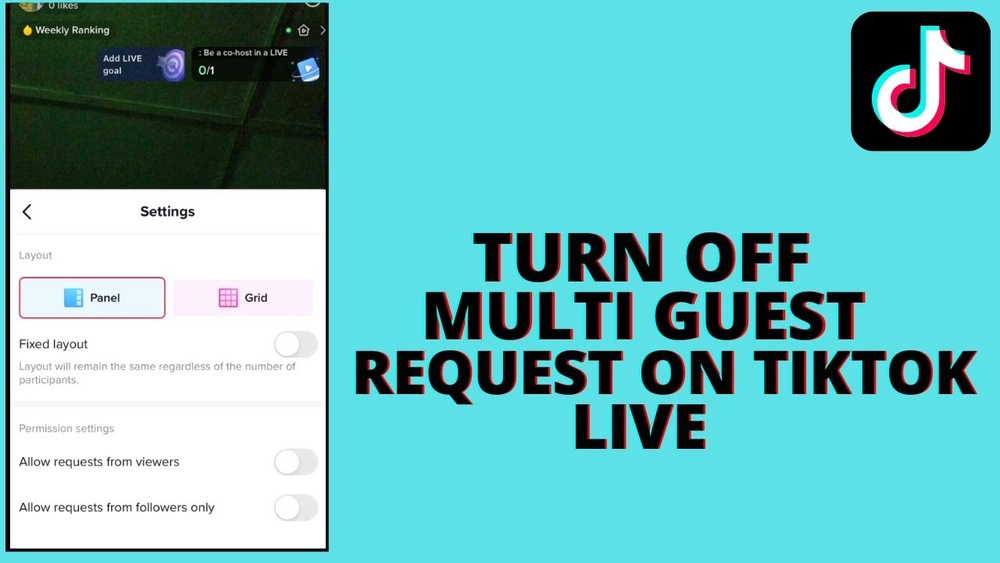
Are you tired of unexpected guests joining your TikTok sessions? Disabling Multiguest can give you full control over who interacts with your content.
In this guide, you’ll learn simple, step-by-step ways to turn off Multiguest on TikTok quickly. By the end, you’ll feel more secure and confident while using the app. Keep reading to take back control of your TikTok experience!
What Is Multiguest On Tiktok
Multiguest on TikTok is a feature that lets multiple users join a live video together. It allows creators to invite friends or followers to appear in the same live stream. This makes the live sessions more interactive and fun.
Viewers can watch different people talk, share ideas, or just hang out in one place. It is like a group video call but inside TikTok’s live streaming.
How Multiguest Works
When a creator starts a live video, they can invite others to join as guests. The invited guests get a notification to accept or decline. Once accepted, their video appears alongside the host on the screen.
Benefits Of Using Multiguest
Multiguest helps increase engagement by adding more voices to the live stream. It allows creators to collaborate with others easily. Fans enjoy watching conversations between multiple guests.
Who Can Use Multiguest
Multiguest is available for TikTok users with a certain number of followers. Usually, creators with larger audiences get this feature first. TikTok may expand access over time to more users.

Credit: blog.push.fm
Reasons To Disable Multiguest
Disabling Multiguest on TikTok can improve your overall experience. It helps control who joins your live sessions. This makes your streams safer and more personal.
Some users prefer to keep their live chats simple. Multiguest can sometimes cause confusion or interruptions. Turning it off gives you more control over your content.
Enhance Privacy During Live Streams
Multiguest allows many people to join live chats. This can expose your personal space. Disabling it keeps your audience smaller and private. It helps protect your information from strangers.
Reduce Distractions And Interruptions
Multiple guests can cause noise and confusion. It is hard to manage many voices at once. Turning off Multiguest helps focus on your main message. Your live stream stays clear and easy to follow.
Maintain Better Control Over Content
Allowing many guests might lead to unwanted topics. You lose control of the conversation flow. Disabling Multiguest keeps your live stream on track. You decide what your audience sees and hears.
Improve Viewer Experience
Too many guests can overwhelm viewers. It makes the stream less enjoyable and harder to watch. A smaller, controlled group keeps viewers engaged. They can follow the content without confusion.
Step-by-step Guide To Disable Multiguest
Disabling the Multiguest feature on TikTok helps control who joins your live sessions. This guide shows how to turn off Multiguest step-by-step. Follow the instructions carefully to adjust your settings quickly.
Accessing Tiktok Settings
Open the TikTok app on your device. Tap the profile icon at the bottom right. Look for the three-line menu on the top right and tap it. Choose “Settings and privacy” from the list. This section holds all your TikTok controls.
Navigating To Privacy Controls
Inside Settings, find the “Privacy” option and tap it. Privacy controls help manage who can interact with you. Scroll down to find settings related to live videos and guests. This is where you will find the Multiguest option.
Turning Off Multiguest Feature
Locate the Multiguest toggle switch in the live video settings. Tap the switch to turn it off. When disabled, others cannot join your live streams as guests. This keeps your live sessions private and secure.

Credit: www.youtube.com
Troubleshooting Common Issues
Disabling the Multiguest feature on TikTok can sometimes be tricky. Users often face common problems that stop them from turning off this option. Troubleshooting these issues helps you manage your settings smoothly. Below are some frequent problems and simple ways to solve them.
Multiguest Option Not Visible
Sometimes, the Multiguest setting does not appear in your app. This can happen if TikTok has not rolled out this feature in your region yet. Check your app version first. Older versions may lack this option. Try logging out and back in. This refreshes your account settings. If the option still does not show, wait a few days and check again.
Changes Not Saving
You might try to disable Multiguest, but your changes do not save. This often happens due to poor internet connection. Ensure you have a stable connection before saving changes. Close the app completely and reopen it. Then, try to disable the feature again. Clearing the app cache also helps fix saving issues.
App Update Requirements
TikTok updates frequently. Some features only work on the latest app version. If you cannot disable Multiguest, check for updates in your app store. Installing the newest version often solves many problems. Keep your app updated to access all settings properly. Updates improve app performance and fix bugs.
Alternatives To Disabling Multiguest
Disabling Multiguest on TikTok is not the only way to control guest access. There are other options that help you manage who can join your sessions. These alternatives keep your account safer while still allowing some flexibility.
You can adjust settings to limit guest activity instead of fully turning off Multiguest. This lets you keep some interaction but reduces risks. Here are two useful alternatives to try.
Managing Guest Access Permissions
You can control what guests can do during your TikTok sessions. Restrict permissions like chatting, sharing links, or sending gifts. This limits their impact without blocking them completely.
Set clear rules for guests before allowing them in. This keeps your sessions orderly and safer. Regularly review these settings to match your comfort level.
Using Account Restrictions
Account restrictions help limit guest actions without disabling Multiguest. You can block or mute specific users who cause trouble. This keeps your space comfortable and respectful.
Use TikTok’s built-in tools to set age limits or content filters. These filters prevent unwanted guests from joining your streams. This way, you maintain control while keeping Multiguest active.

Credit: x.com
Tips For Maintaining Account Security
Keeping your TikTok account safe is very important. It helps protect your personal information and stops others from using your account without permission. Simple steps can make your account more secure. Follow these tips to keep control and stay safe online.
Regularly Updating Passwords
Change your password often. Use a mix of letters, numbers, and symbols. Avoid easy passwords like birthdays or names. A strong password makes it hard for others to guess. Don’t use the same password for other accounts.
Reviewing Connected Devices
Check which devices are logged into your TikTok account. Remove devices you do not recognize. This stops strangers from accessing your account. Regular checks help find any unwanted activity early.
Enabling Two-factor Authentication
Turn on two-factor authentication (2FA). It adds an extra step to verify your identity. You will need a code sent to your phone or email. This makes it harder for hackers to get in, even with your password.
Frequently Asked Questions
What Is Tiktok Multiguest Feature?
TikTok Multiguest allows multiple users to join a live session. It enables interactive group streaming and real-time engagement. This feature enhances collaboration and viewer participation during live broadcasts.
How Can I Disable Multiguest On Tiktok?
To disable Multiguest, go to your live stream settings. Find the Multiguest option and toggle it off. This will prevent others from joining your live session as guests.
Does Disabling Multiguest Affect My Live Stream Quality?
No, disabling Multiguest does not impact live stream quality. It only restricts guest participation. Your video and audio will remain clear and stable during the broadcast.
Can I Enable Multiguest Again After Disabling It?
Yes, you can re-enable Multiguest anytime. Simply access your live settings and toggle the feature back on. This flexibility helps manage who joins your live sessions.
Conclusion
Disabling Multiguest on TikTok helps control who joins your live sessions. It keeps your space safe and private. Follow the easy steps to turn off this feature. Doing so gives you better control over your content. Stay aware of app updates to manage settings well.
Keep your TikTok experience comfortable and secure. Small changes make a big difference in how you use the app. Enjoy creating content with fewer distractions and more focus.