How to Check Keywords of a Website
Want to know how to check the keywords of a website? Whether you’re trying to boost your own site’s traffic or spy on your competition, understanding which keywords a website uses is a game-changer.
You might think it’s complicated or requires expensive tools, but it doesn’t have to be. You’ll discover simple and effective ways to uncover the keywords behind any website. By the end, you’ll have the power to improve your SEO strategy and get ahead online.
Ready to unlock these secrets? Let’s dive in.
Why Keywords Matter
Keywords play a key role in website success. They help search engines find and rank your pages. Using the right keywords makes your site more visible to users. This increases traffic and potential customers. Understanding why keywords matter helps you improve your online presence.
Impact On Search Rankings
Search engines use keywords to understand page content. Pages with relevant keywords rank higher in search results. Higher ranking means more visitors to your site. Keywords act as signals that guide search engines. Choosing the right keywords boosts your chances of being found.
Attracting Target Audience
Keywords attract visitors who want what you offer. Using specific keywords reaches the right people. This improves the quality of your website traffic. Visitors who find relevant content stay longer and engage more. Keywords connect your site with users’ needs and interests.
Types Of Keywords To Track
Tracking the right types of keywords helps you understand a website’s search performance. Each keyword type shows different user intent and competition levels. Focus on these categories to get a clear picture of keyword strength and opportunities.
Short-tail Vs Long-tail
Short-tail keywords are brief and broad. They often have high search volume but more competition. Examples include “shoes” or “coffee.”
Long-tail keywords are longer and more specific. They have lower search volume but higher conversion rates. For instance, “men’s running shoes size 10” or “best organic coffee beans.”
Tracking both types helps balance traffic and targeted visitors.
Branded And Non-branded
Branded keywords include a company or product name. For example, “Nike running shoes.” These show strong brand interest.
Non-branded keywords don’t mention brand names. They describe products or services generally, like “running shoes.”
Monitoring both reveals brand awareness and general market demand.
Competitor Keywords
Competitor keywords are terms your rivals rank for. Analyzing these helps find gaps and new keyword ideas.
Checking competitor keywords shows what works in your niche. It guides your own keyword strategy.
Tools To Check Website Keywords
Tools to check website keywords help you find which words bring traffic to a site. These tools show the keywords a website ranks for and their search volumes. This information helps improve your SEO and content strategy. Different tools offer various features and data depths. Some are free and easy to use, while others require payment but provide detailed insights.
Free Keyword Research Tools
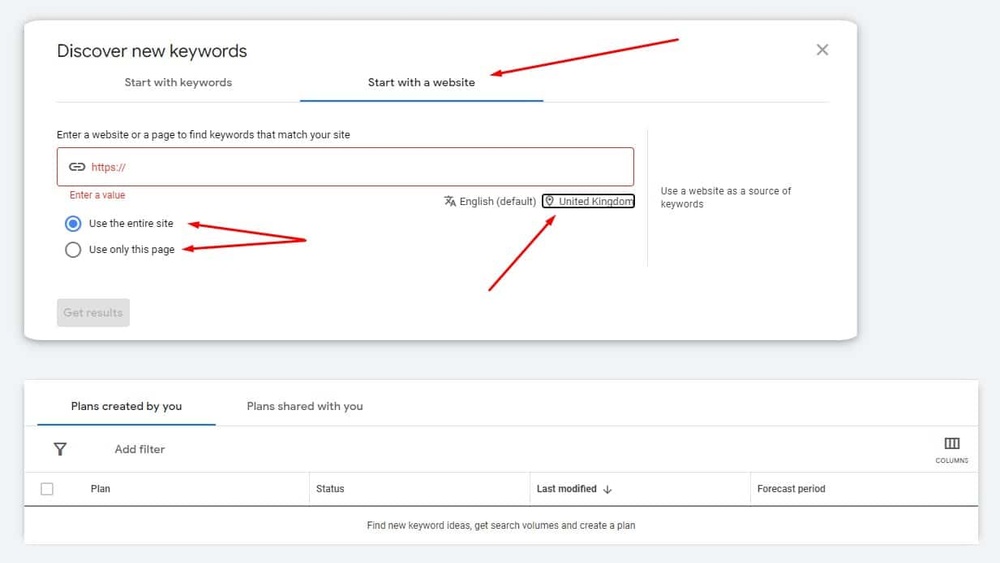
Free tools let you check keywords without spending money. Google Keyword Planner is a popular choice. It shows keyword ideas and search volume. Ubersuggest offers keyword suggestions and site analysis. AnswerThePublic provides questions and phrases people search for. These tools work well for beginners and small websites. They provide basic data but can guide your keyword strategy.
Paid Seo Platforms
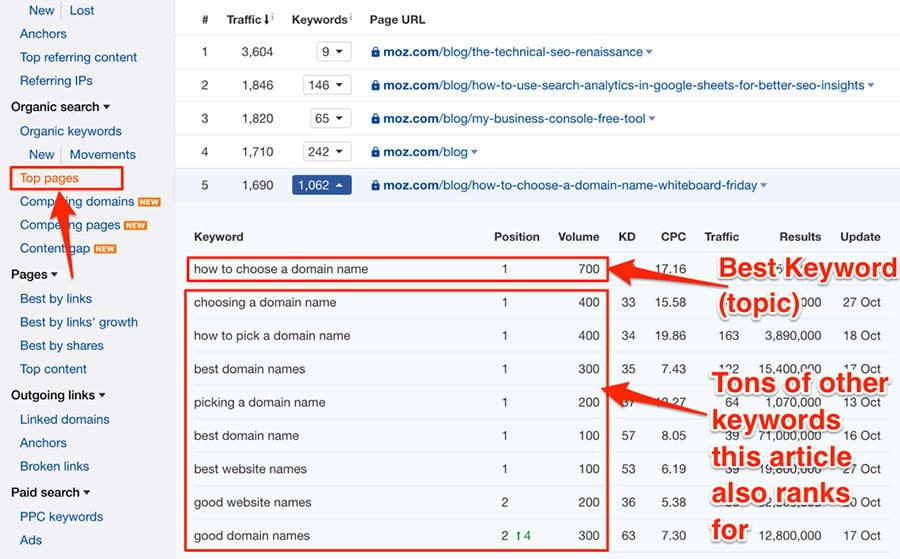
Paid platforms offer in-depth keyword data and competitive analysis. SEMrush is widely used for keyword tracking and site audits. Ahrefs provides detailed keyword reports and backlink data. Moz Pro helps with keyword research and rank tracking. These tools deliver more accurate and comprehensive information. They suit businesses serious about SEO growth. Monthly fees apply, but the insights can boost your website’s performance.
Browser Extensions
Browser extensions provide quick keyword data while browsing websites. Keywords Everywhere shows search volume and cost per click directly on search pages. SEOquake offers on-page SEO metrics and keyword density analysis. MozBar displays page authority and keyword info in your browser. These tools save time by giving instant keyword insights. They are easy to install and use without leaving your browser.
Credit: www.advancedelectrical.org.uk
Step-by-step Keyword Analysis
Step-by-step keyword analysis helps you understand what words a website targets. It shows the words that bring visitors to the site. This process helps improve your own site or check competitors.
Breaking down the analysis into clear steps makes it simple. Each step builds on the last to give a full picture of keyword use. Start by finding the keywords, then check their performance, and finally measure their difficulty.
Extracting Keywords From A Website
Begin by gathering all the keywords used on the site. Use tools like SEO crawlers or browser extensions. These tools scan the page content and meta tags for important words. Note down keywords from titles, headings, and body text. Don’t forget keywords in image alt text and URLs.
Copy the list into a spreadsheet for easy review. Group similar keywords to see main topics. This step gives a clear base for deeper analysis.
Analyzing Keyword Performance
Next, check how each keyword performs in search engines. Use keyword research tools to find search volume and traffic data. Look for keywords that bring steady visitors. Also, check the click-through rate and ranking positions.
Mark strong keywords that attract good traffic. Spot those with low performance for possible improvement. This analysis shows which keywords work best and which need work.
Assessing Keyword Difficulty
Finally, evaluate how hard it is to rank for each keyword. Keyword difficulty depends on competition and search volume. Use online tools that score difficulty from low to high. Low difficulty keywords are easier to rank for but may have less traffic.
Balance difficulty with potential traffic to choose the best targets. Focus on keywords that fit your website’s strength and goals. This step helps in planning effective SEO strategies.
Using Competitor Keyword Insights
Using competitor keyword insights is a smart way to improve your website’s SEO. This method helps you learn what keywords others in your field use. It also shows you opportunities to grow your own keyword list. By studying competitors, you can find ideas to attract more visitors.
Identifying Top Competitors
First, find websites that rank for your main topics. These sites are your top competitors. Use tools like Google Search or SEO platforms to spot them. Check which sites appear most often for your target keywords. These are the best ones to analyze.
Comparing Keyword Strategies
Next, examine the keywords your competitors use. Look at which keywords bring the most traffic to their sites. Note the mix of short and long keywords. See how they match keywords with content types. This helps you understand their SEO approach.
Finding Keyword Gaps
Finally, find keywords your competitors rank for but you do not. These gaps are chances to add new keywords to your site. Use SEO tools to spot these missing keywords. Targeting them can help you reach new audiences easily.
Credit: seodity.com
Optimizing Content With Keywords
Optimizing content with keywords helps search engines understand your page. It also guides visitors to the right information. Using keywords well can improve your website’s ranking. The key is balance and relevance.
Keyword Placement Best Practices
Place keywords in important areas like titles and headings. Use them in the first 100 words of your content. Add keywords naturally in meta descriptions and image alt text. Spread keywords evenly throughout the text. This helps search engines and readers alike.
Avoiding Keyword Stuffing
Too many keywords make content hard to read. It may also cause penalties from search engines. Use keywords only when they fit the sentence. Focus on clear and useful information. Quality beats quantity every time.
Improving User Experience
Good content keeps visitors on your site longer. Use keywords to guide readers, not confuse them. Write for people first, then for search engines. Fast loading pages and simple design also help. A happy visitor often means better rankings.
Tracking Keyword Rankings Over Time
Tracking keyword rankings over time helps measure SEO success. It shows how well your website performs for specific search terms. Watching these changes guides your next steps in SEO. It helps spot trends and areas needing work. Consistent tracking builds a clear picture of growth and challenges.
Setting Up Rank Tracking
Choose a reliable rank tracking tool. Many options offer daily or weekly updates. Add your target keywords to the tool. Enter your website’s URL for accurate tracking. Set the tracking location to match your audience. This ensures the results reflect your market. Start monitoring regularly to collect data over time.
Interpreting Ranking Fluctuations
Rankings change naturally due to search engine updates. Small ups and downs are normal. Large drops may signal problems with your site. Sudden gains could mean recent SEO efforts work. Compare ranking changes with SEO activities. Use this data to understand what affects your site’s position.
Adjusting Seo Strategies
Use ranking data to improve your SEO plans. Focus more on keywords that show steady growth. Revise content for keywords with declining ranks. Test new tactics like updating meta tags or adding links. Monitor results after changes to see their impact. Keep refining your strategy based on real ranking trends.

Credit: seomator.com
Common Keyword Research Mistakes
Keyword research is key for website success. Many make avoidable errors that hurt results. Knowing common mistakes helps improve your strategy. Avoid these pitfalls to get better keyword insights.
Ignoring Search Intent
Search intent shows why users type certain words. Ignoring it leads to wrong keyword choices. Focus on what users want: information, buying, or navigation. Match keywords to user goals for better traffic.
Overlooking Long-tail Keywords
Long-tail keywords have fewer searches but less competition. Many skip these, missing easy ranking chances. Use specific phrases to attract targeted visitors. They often convert better than broad terms.
Relying On Outdated Data
Keyword trends change fast. Using old data gives wrong insights. Use fresh tools and update your research regularly. Stay current to catch new opportunities and avoid lost traffic.
Frequently Asked Questions
How Can I Check Keywords Of Any Website?
Use SEO tools like Ahrefs, SEMrush, or Ubersuggest. Enter the website URL to see its top keywords and rankings quickly.
Why Is Keyword Analysis Important For Websites?
Keyword analysis helps understand what terms drive traffic. It guides content strategy and improves search engine rankings effectively.
What Free Tools Can Identify Website Keywords?
Google Keyword Planner, Ubersuggest, and Keyword Surfer provide free keyword insights. They show popular keywords and search volumes easily.
Can I See Competitors’ Keywords For Better Seo?
Yes, tools like SEMrush and Ahrefs reveal competitors’ top keywords. This helps you optimize your content to outperform them.
Conclusion
Checking a website’s keywords helps understand its content focus. Use simple tools to find which words attract visitors. This knowledge guides your own content choices. Regularly reviewing keywords keeps your site relevant. Stay curious and practice often. Small steps lead to better results.
Keep learning and improving your skills.