Are you curious about how many people are following your YouTube channel? Knowing your subscriber count is more than just a number—it shows how your content connects with others and helps you grow your presence online.
But finding this information can sometimes feel confusing or overwhelming. Don’t worry—you’re in the right place. You’ll learn simple and clear steps to check your YouTube subscribers quickly. By the end, you’ll have the confidence to track your progress and keep your channel moving forward.
Ready to see your subscriber count? Let’s dive in!
Credit: klintmarketing.com
Accessing Your Youtube Studio
Accessing your YouTube Studio is the first step to check your subscriber count. YouTube Studio is a free tool provided by YouTube. It helps creators manage their channels and track their growth.
You can see your subscribers, video performance, comments, and more. The process to access it is simple and fast.
Logging Into Your Account
Start by opening the YouTube website. Click on the “Sign In” button at the top right corner. Enter your email and password linked to your YouTube channel. Use the same Google account you use for your channel. After logging in, you will land on the YouTube homepage.
Navigating To Youtube Studio
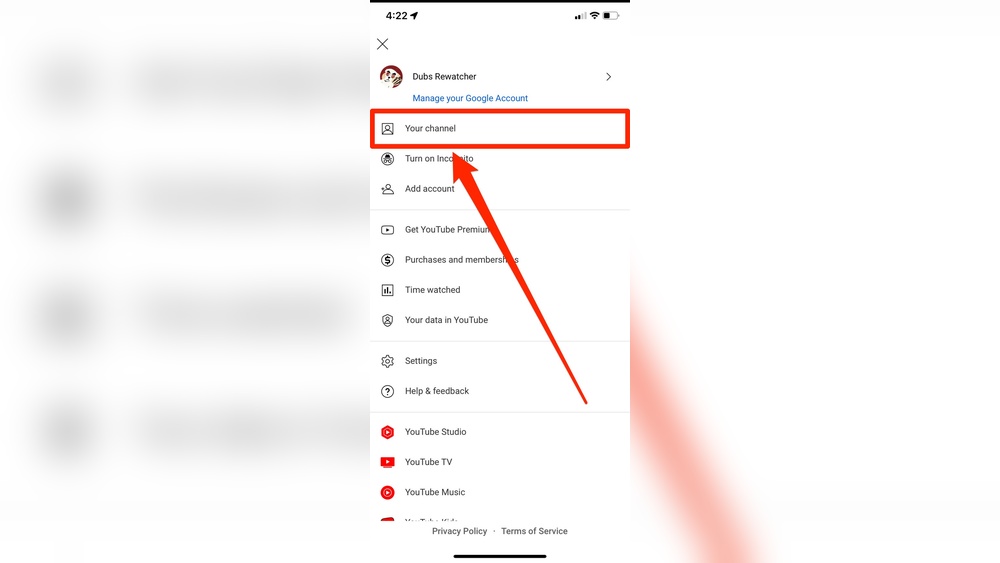
Click on your profile icon at the top right corner. A dropdown menu will appear. Select “YouTube Studio” from the list. This will open the dashboard for your channel. Here, you can see your subscriber count and other analytics. The Studio updates your data in real time.

Credit: www.youtube.com
Finding Subscriber Count
Finding your subscriber count on YouTube is simple. Knowing this number helps you track your channel growth. It shows how many people like your content and want to see more.
You can find this number in a few places within your YouTube account. Two main spots show your subscriber count clearly. These spots give quick and detailed views of your subscribers.
Using The Dashboard
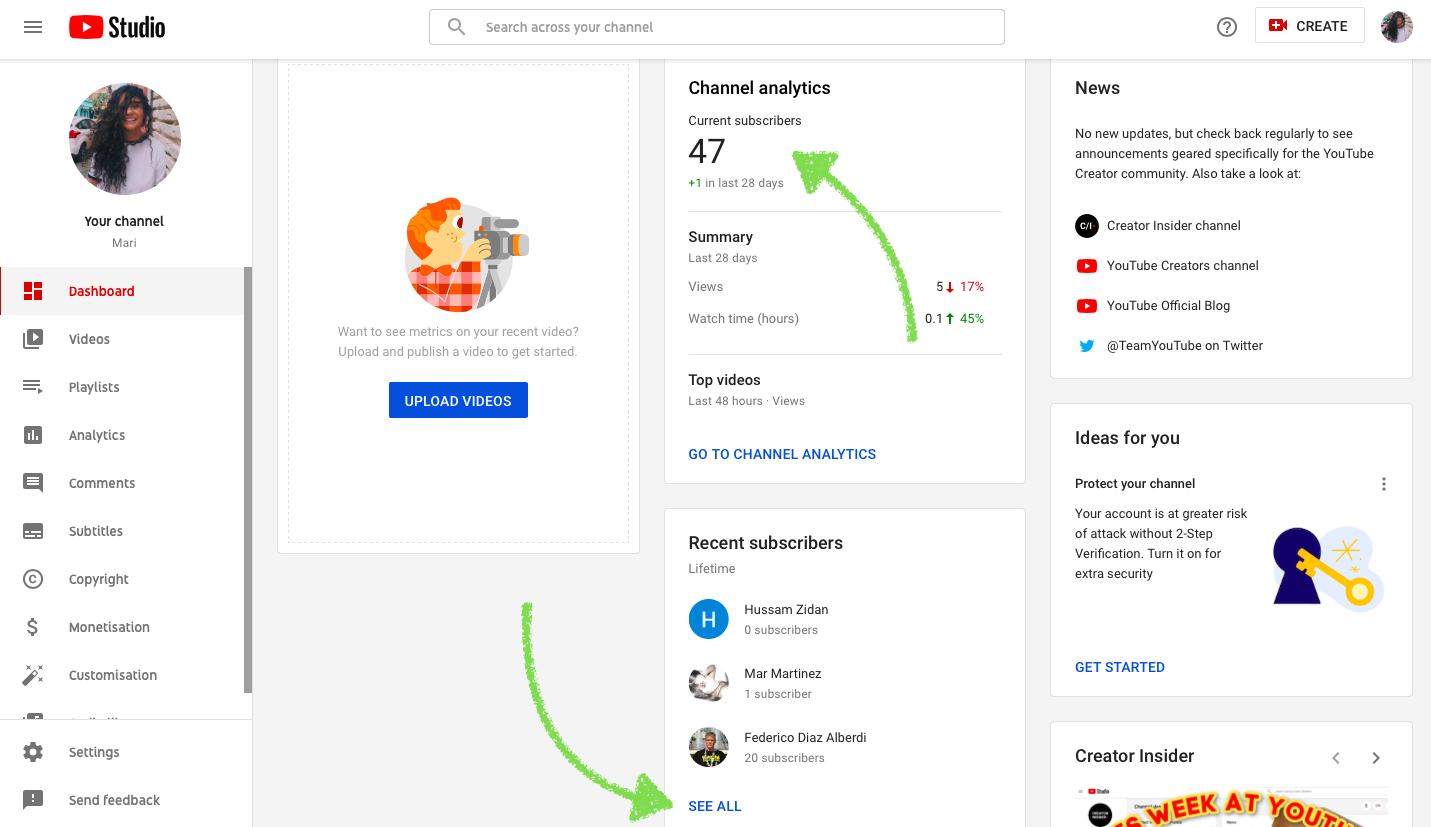
The YouTube Dashboard is the first place to check. Log into your YouTube Studio to access it. On the main page, you see your channel’s key stats. Your subscriber count is shown in big numbers here. It updates in real-time or close to it. This view is easy for a quick check.
The Dashboard also shows other important data like views and watch time. It helps you get a quick idea of your channel’s health. Use this if you want a fast look at your subscribers.
Checking The Channel Analytics
Channel Analytics gives a deeper look at your subscribers. Click on the Analytics tab in YouTube Studio. Here, you can see how your subscriber count changed over time. It shows daily, weekly, or monthly growth. This helps understand trends and audience interest.
You can also see where your subscribers come from. Analytics shows their location and what videos they like. It gives insights to improve your content. Use this to plan your next videos based on real data.
Tracking Subscriber Growth Over Time
Tracking subscriber growth over time helps you understand your YouTube channel’s progress. It shows how your audience changes day by day. Watching these patterns helps you improve your content. It also shows which videos attract more subscribers. This way, you can plan better and grow your channel steadily.
Using The Analytics Tab
Go to your YouTube Studio to start. Click on the Analytics tab. Here, you see detailed subscriber data. It shows daily, weekly, and monthly trends. You can spot peaks or drops in subscribers. This data helps you learn what works best. Watching these numbers regularly keeps you informed.
Customizing Date Ranges
Adjust the date range in Analytics to track different periods. Choose a week, a month, or even a year. This helps compare subscriber growth over time. You can see if recent videos helped gain more followers. Custom dates make your analysis clear. Use this tool to find growth patterns easily.
Interpreting Subscriber Data
Interpreting subscriber data helps you understand your audience better. It shows which videos attract more viewers. It also reveals how your channel grows over time. This insight guides your future content decisions. Watching the data regularly keeps your channel on track.
Identifying Trends
Check for patterns in subscriber growth. Notice which days or weeks gain more subscribers. See if certain video topics attract more fans. Track if your subscriber count rises after new uploads. Recognize these trends to create popular content.
Understanding Subscriber Sources
Look at where your subscribers come from. Some join from YouTube search results. Others come from suggested videos or external sites. Knowing these sources helps you focus your promotion efforts. It also shows which platforms bring the most viewers to your channel.
Using Third-party Tools
Using third-party tools to check your YouTube subscribers offers a quick and easy way to track your channel’s growth. These tools provide real-time data and detailed analytics beyond YouTube’s basic interface. They help you understand your audience better and compare your progress with others.
Many of these tools are free or offer free versions. They work on any device with internet access. You just need to enter your channel name or URL, and the tool shows your subscriber count and other stats. This method saves time and adds convenience.
Popular Subscriber Tracking Tools
Several third-party tools stand out for their reliability and ease of use. Social Blade is one of the most popular options. It provides subscriber counts, estimated earnings, and channel rankings. Another tool is Noxinfluencer, which offers detailed analytics and growth trends. TubeBuddy is also widely used for subscriber tracking and channel management. These tools serve various needs, from simple counts to in-depth analysis.
Benefits And Limitations
Third-party tools give quick access to subscriber data and growth trends. They offer features not available on YouTube’s native platform. These tools can help identify the best times to post and popular content types. On the downside, their data may not always be 100% accurate. Some tools experience delays in updating subscriber counts. Privacy concerns may arise as these tools require access to your channel information. Always use trusted tools and avoid sharing sensitive details.
Tips To Boost Subscriber Count
Growing your YouTube subscriber count takes effort and smart strategies. Simple steps can help you attract more viewers and keep them interested. Focus on creating content that people want to watch and sharing your channel where others will see it. These tips will guide you to build your audience steadily.
Creating Engaging Content
Make videos that are clear and interesting. Choose topics that your audience cares about. Use good lighting and sound to improve quality. Keep videos short and to the point to hold attention. Ask questions or encourage comments to involve viewers. Regular uploads help viewers know when to expect new videos.
Promoting Your Channel
Share your videos on social media platforms. Join online groups related to your content and participate actively. Use catchy titles and thumbnails to attract clicks. Collaborate with other YouTubers to reach new audiences. Add your channel link in email signatures or forums. Consistent sharing helps more people discover your channel.

Credit: www.tastyedits.com
Frequently Asked Questions
How Can I Quickly Check My Youtube Subscribers?
You can check your YouTube subscribers by logging into YouTube Studio. Go to the Dashboard, and your subscriber count appears at the top. This method is fast, accurate, and updates in real-time.
Where To Find Detailed Subscriber Analytics On Youtube?
Detailed subscriber analytics are available under the “Analytics” tab in YouTube Studio. Here, you can see subscriber growth, demographics, and engagement trends for better insights.
Why Is My Youtube Subscriber Count Not Updating?
YouTube sometimes delays updating subscriber counts due to caching or system sync issues. Usually, the count refreshes within 24 to 48 hours automatically.
Can I See Who Subscribed To My Youtube Channel?
Yes, you can view recent subscribers in YouTube Studio under the “Recent Subscribers” section. However, this only shows users who made their subscriptions public.
Conclusion
Checking your YouTube subscribers is simple and quick. You only need to follow a few easy steps. This helps you know how your channel grows over time. Watching your subscriber count can motivate you to create better content. Stay consistent and keep improving your videos.
Remember, every subscriber counts and brings you closer to your goals. Keep an eye on your numbers regularly. This way, you understand your audience better. Start checking your subscribers today and enjoy your YouTube journey.