Are you curious about who’s following your YouTube channel? Knowing how to view your subscribers can give you valuable insights into your audience and help you grow your channel faster.
Imagine having a clear picture of who supports your content and what keeps them coming back. You’ll discover simple steps to easily find your subscriber list and understand why this knowledge is key to boosting your channel’s success. Keep reading, and unlock the power of your YouTube community!
Credit: klintmarketing.com
Accessing Your Youtube Studio
To see your YouTube subscribers, the first step is getting into YouTube Studio. This platform is where you manage your channel, check analytics, and interact with your audience. Knowing how to access it quickly saves you time and keeps you connected with your viewers.
Logging Into Your Account
Start by opening YouTube.com and clicking the “Sign In” button at the top right corner. Enter your email and password linked to your YouTube channel.
If you have multiple Google accounts, make sure you select the one connected to your channel. You don’t want to waste time searching for your subscriber info on the wrong account.
Navigating To Youtube Studio
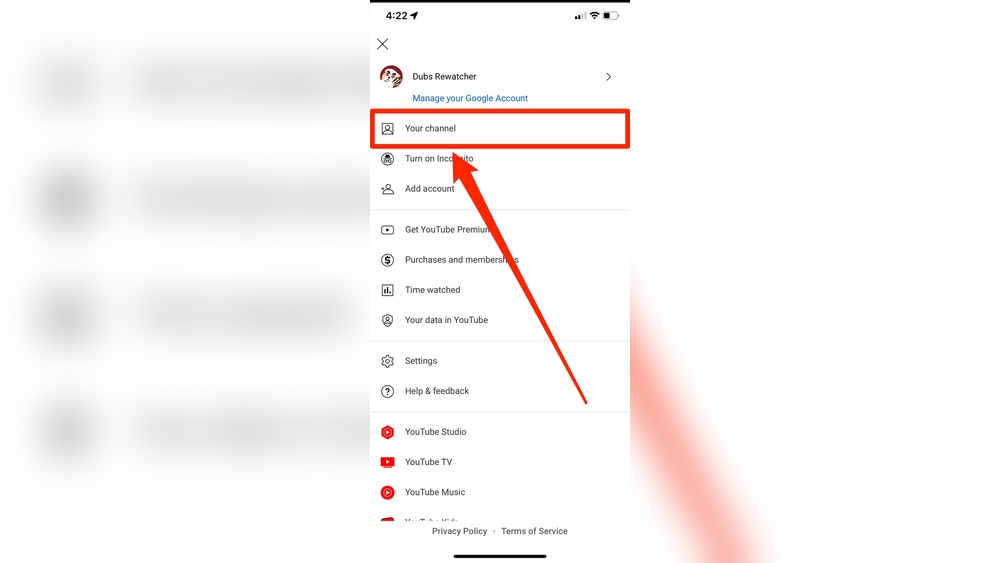
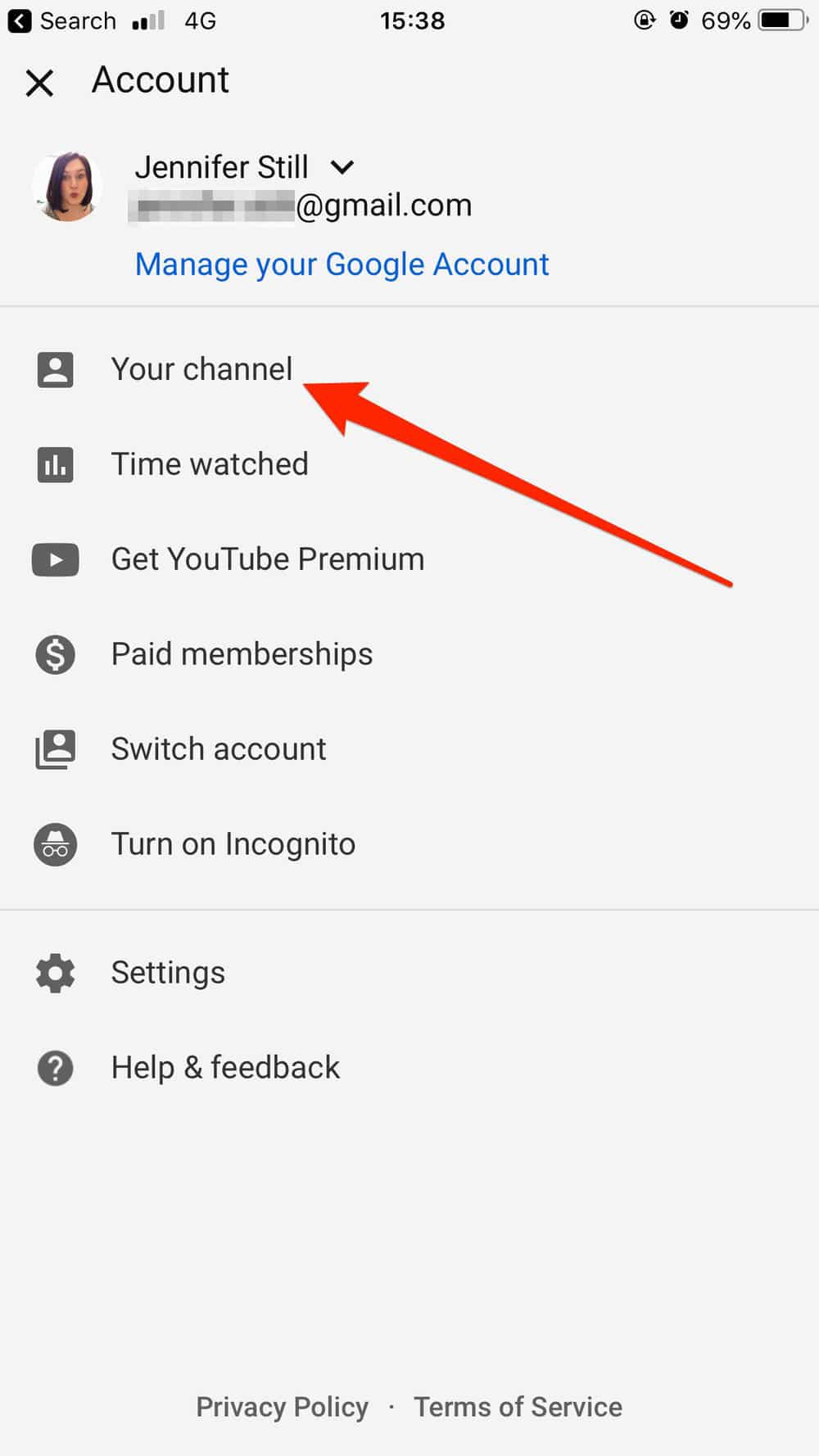
Once logged in, click on your profile icon in the top right corner. A dropdown menu appears—select “YouTube Studio.”
YouTube Studio opens in a new tab, showing your channel dashboard. This is your control center for managing videos, comments, and importantly, your subscriber list.
Have you noticed how many creators skip checking their subscriber details regularly? Staying updated helps you understand who’s supporting your channel and how your audience grows over time.
Locating Subscriber Data
Finding your subscriber data on YouTube is important to track your channel’s growth. YouTube offers simple tools to help you see who follows you. These tools give clear information about your subscribers and how they interact with your videos.
This section explains how to locate your subscriber data easily using YouTube’s main features.
Using The Dashboard Overview
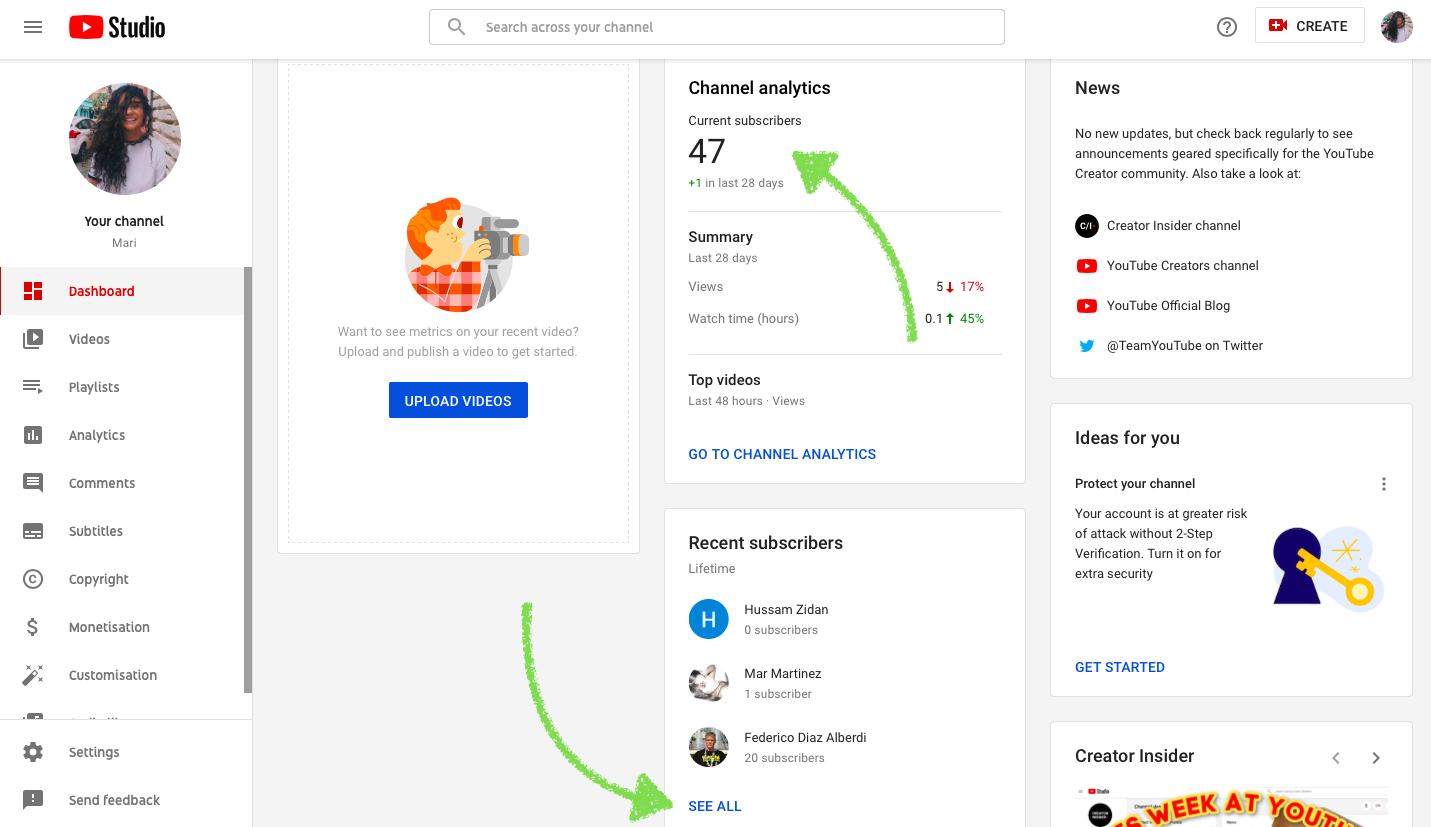
The Dashboard Overview is the first page you see after logging into YouTube Studio. It shows basic stats about your channel, including your current subscriber count. You can find your total number of subscribers here at a glance. This area also gives updates on recent activity, like new subscribers gained today or this week.
For quick checks, the Dashboard Overview is very useful. It helps you stay informed without digging through many menus.
Exploring The Analytics Section
The Analytics Section provides detailed information about your subscribers. You can see changes in subscriber numbers over days, weeks, or months. This data helps understand trends, such as when your channel gains or loses followers.
Analytics also shows who your subscribers are, including their location and age groups. This insight helps you create better content suited for your audience. To access Analytics, click the “Analytics” tab in YouTube Studio’s left menu.
Interpreting Subscriber Metrics
Understanding your subscriber metrics helps you see how your channel grows. It shows who joins and leaves your community. Tracking these numbers guides your content and marketing efforts. This section explains how to read these key figures clearly.
Understanding Subscriber Count Changes
Subscriber count changes show how many people join or leave your channel. A rise means more viewers like your videos. A drop may signal less interest or inactive subscribers. Watch these trends over days or weeks. Sudden changes often link to new videos or events. Consistent growth is a good sign of success.
Identifying Subscriber Sources
Subscriber sources reveal where your new subscribers come from. They can find you through search, suggested videos, or external sites. Knowing sources helps focus your promotion efforts. For example, if most come from search, improve your video titles and tags. If suggested videos bring viewers, keep videos related and engaging. This insight helps build a loyal audience.

Credit: www.tastyedits.com
Viewing Subscriber Details
Viewing subscriber details on YouTube helps you understand your audience better. It shows who supports your channel and how your content connects with people. You can see recent subscribers and visit their profiles. This information guides you in creating videos your viewers enjoy.
Knowing your subscribers also helps build a community. It gives you ideas to interact and respond to your audience. Let’s explore how to access and check subscriber details step by step.
Accessing Recent Subscribers List
Go to YouTube Studio to find your subscriber information. On the left menu, click “Analytics.” Then select the “Audience” tab at the top. Scroll down to see the “Recent Subscribers” section. This list shows users who subscribed recently.
You can set the time frame to view subscribers from the last 28 days or longer. The list displays subscriber names, subscription date, and subscriber count. Note that some subscribers may appear as anonymous if their settings are private.
Checking Subscriber Profiles
Click on a subscriber’s name in the recent subscribers list. This action opens their YouTube channel page. Here, you can learn about their interests by viewing their uploaded videos and playlists.
Subscriber profiles help you know what type of content they like. It also shows if they are active creators or casual viewers. Understanding this helps tailor your videos to attract more subscribers like them.
Tracking Growth Over Time
Tracking your YouTube subscriber growth over time shows how your channel develops. It helps you understand what content works and what does not. Watching these changes guides you to make better videos and gain more followers.
Using Time Range Filters
YouTube Analytics lets you choose different time periods to view subscriber data. Select daily, weekly, or monthly ranges to see how subscribers change. This helps spot short-term spikes or long-term growth clearly. Pick a time range that fits your goals for detailed insights.
Comparing Subscriber Trends
Compare subscriber counts across different time frames to identify patterns. Look at growth during special events or after new videos. This comparison reveals what causes subscriber gains or losses. Use these trends to plan your future content strategy effectively.
Credit: pitta-patta.com
Tips To Boost Subscriber Engagement
Boosting subscriber engagement is key to growing your YouTube channel. Engaged subscribers watch more videos and share your content. They also leave comments and interact with your channel. This creates a community around your videos. Here are some tips to help increase engagement with your subscribers.
Creating Quality Content Consistently
Quality content keeps viewers coming back. Plan your videos with clear topics and good visuals. Upload regularly to build trust with your audience. Consistency helps subscribers expect new content. Avoid long gaps between uploads. Use clear titles and descriptions to attract the right viewers. Focus on topics your audience cares about.
Engaging With Your Audience
Talk to your viewers through comments and community posts. Respond to questions and thank people for their feedback. Ask viewers to share their thoughts or ideas for future videos. Use polls to learn what they want next. This shows you value their input. Engagement builds loyalty and encourages more interaction. Make your audience feel part of your channel.
Frequently Asked Questions
How Can I See My Youtube Subscribers List?
To view your YouTube subscribers, go to YouTube Studio and click “Subscribers” on the Dashboard. You’ll see a list of recent subscribers who made their subscriptions public.
Can I See All My Youtube Subscribers?
No, YouTube only shows subscribers who have their subscriptions set to public. Private subscriptions won’t appear in your subscribers list.
Where Is The Subscribers Tab On Youtube Studio?
The subscribers tab is located on the YouTube Studio Dashboard under the “Recent Subscribers” section. Click “See all” to view more details.
How Often Does Youtube Update Subscriber Information?
YouTube updates subscriber data in real-time but may take up to 48 hours to reflect recent changes in subscriber counts.
Conclusion
Tracking your YouTube subscribers helps you understand your audience better. Check your subscriber list regularly to see who supports your channel. Use YouTube Studio for easy access and clear details. Knowing your subscribers lets you create content they enjoy. Stay consistent and watch your community grow over time.
Keep it simple and have fun sharing your videos.